How to build an AI marketing knowledge base: 8 modules, clear rules and a template
Most AI initiatives in marketing don't fail because of the model. They fail because the knowledge is scattered across prompts, slide decks and people's heads. An AI marketing knowledge base puts the revenue logic of your business in one place: eight modules, each with an owner, that every agent works from. Here's how I build one, with filled-in examples you can use as a template.
 ByMario Maier
Published 20 min read
Contents
- Why prompts and scattered docs fail
- What is an AI marketing knowledge base?
- What goes in the knowledge base – and what goes in the prompt?
- The 8 modules with a template, part 1: market and message
- The 8 modules with a template, part 2: truth, rules and memory
- Structure, versions and approvals: how the knowledge base stays current
- How do agents use the knowledge base – load it all or retrieve what they need?
- Which metrics show that your knowledge base is working?
- Common mistakes when building an AI marketing knowledge base
- How to build your AI marketing knowledge base in four weeks
- My take
Why prompts and scattered docs fail
When AI disappoints in marketing, the problem is rarely the model and usually the knowledge it works from. An AI marketing knowledge base is the one place where that knowledge is written down properly: who your ICP is, how your buying center buys, which claims you're allowed to make, what matters this quarter. Without that place, everyone writes their own prompt, and every prompt tells a slightly different story.
What I see in project after project is ten people, ten prompts, ten versions of your positioning. The ICP lives in a deck from the last offsite, the proof points in a sales presentation, the pricing logic in a Slack thread, the tone of voice in the head of whoever runs marketing. An experienced human can piece that together; an agent can't. It takes what's in the prompt and fills in the rest with generic knowledge that sounds plausible.
Once AI goes into production, the first thing you notice is drift. Strategy changes and the prompts don't: an angle gets killed in the weekly and lives on in seven prompts and two automations. Then come the contradictions. Two documents say different things about the same feature, the agent picks one at random, and nobody notices until a prospect asks.
What annoys me most is the missing provenance. When an agent writes a wrong claim, you can't tell where it came from. With no source there's no correction, and without corrections the system learns nothing.
More speed fixes none of this. It multiplies the inconsistency. Output ↑. Pipeline →.
AI without a system just produces the wrong thing faster.
Below is how I build a marketing knowledge base for AI agents: which eight modules go into it, who owns each one, how often it changes and which agents read it. Every module comes with a filled-in example entry, and put together, the examples form a template whose structure you can copy straight away. To see where the knowledge base sits in the overall system, take a look at the RevPrime® knowledge base overview.
Prompts & decks
- Every prompt has its own truth
- Changes don't reach every agent
- No source, no owner, no version
- Corrections get lost in chat
Knowledge base
- One source for every agent
- Change it once, all follow the same day
- Every module with owner and version
- Every no with a reason becomes knowledge
Scattered knowledge multiplies inconsistency. One shared source makes every change effective for every agent the same day.
What is an AI marketing knowledge base?
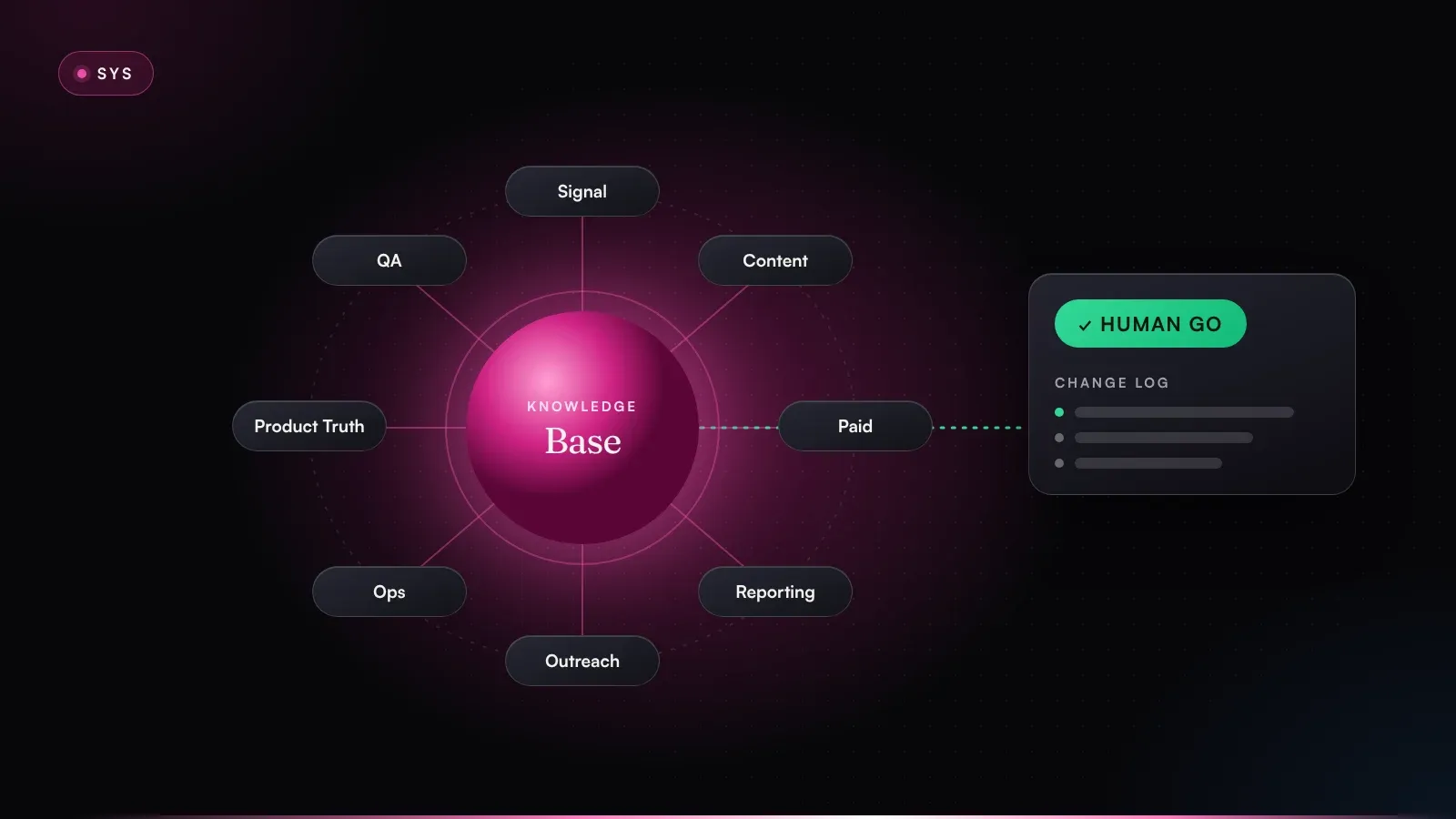
An AI marketing knowledge base is a structured, versioned collection of the knowledge agents need to do marketing work the way your business would want it done. It doesn't need everything your company knows. The revenue logic is enough: who you sell to, how those customers buy, what you say and what you don't, what's a priority right now and which rules apply.
Three distinctions I find useful:
- It's not a wiki. A Confluence or Notion wiki is written for humans: prose, history, opinions, stale pages next to current ones. Agents need fixed fields, a status per entry and exactly one valid version.
- It's not a brand book. The brand book is one module out of eight. Store only your tone of voice and you'll get copy that sounds great and misses the segment.
- It's not a vector database. Whether agents later retrieve content through search or load it in full is a technical question. The knowledge base is the source. How it gets read is a decision you make afterward.
In RevPrime®, the knowledge base is the core. Every agent works from the same source and none of them carries its own knowledge, which you notice in day-to-day work in two ways. A new agent is productive from day one, because it simply reads what it needs to know. A change in strategy, for its part, reaches every agent the same day, because it happens in one single place. For how the agents themselves are built, see the guide to AI agents for B2B marketing.
Agents amplify what's there: clarity as much as chaos. Your agents will never be better than your knowledge base.
What goes in the knowledge base – and what goes in the prompt?
Most setups go wrong on this question, because nobody ever asks it deliberately. My rule of thumb for it is simple. If an agent needs to know something to do its job well, it belongs in the knowledge base.
The prompt describes the role, meaning what this agent does, in which steps, in which output format and from which modules it reads. The knowledge base holds the business: what's true, what applies and what's been decided. So a good agent prompt is surprisingly short and says almost nothing about your product.
Two questions settle where something goes: do several agents need it, or just one? Is it valid for months, or only for this one task?
What many agents need for months belongs in the knowledge base. The prompt only describes the role; live data stays in the tools.
| Content | Where it goes | Why |
|---|---|---|
| ICP exclusion criteria | Knowledge base · ICP | Signal, paid media and outreach need the same list |
| Approved and forbidden claims | Knowledge base · brand & legal | Applies to every piece of copy, not just one agent |
| Score threshold for sales handoff | Knowledge base · priorities | Changes by decision, not by editing a prompt |
| Working steps and output format | Prompt | Describes the role, not the business |
| Which modules the agent reads | Prompt | The link to the knowledge base |
| Data about a specific account | Task input from the CRM | Changes daily and belongs in the source system |
| Live metrics from ads and CRM | Query in the tool | Read, not copied |
Here's a warning sign you can check today: do any of your prompts contain a number, a price, a product name or a segment? Then that sentence very likely belongs in the knowledge base. In a prompt it goes stale quietly, and nobody owns it.
The reverse holds too: not everything belongs in the knowledge base just because it matters. Account data, campaign performance and pipeline numbers stay in your CRM and ad accounts. Agents read them there when they need them. Copy live data in there and within a few weeks you have your next stale truth.
The 8 modules with a template, part 1: market and message
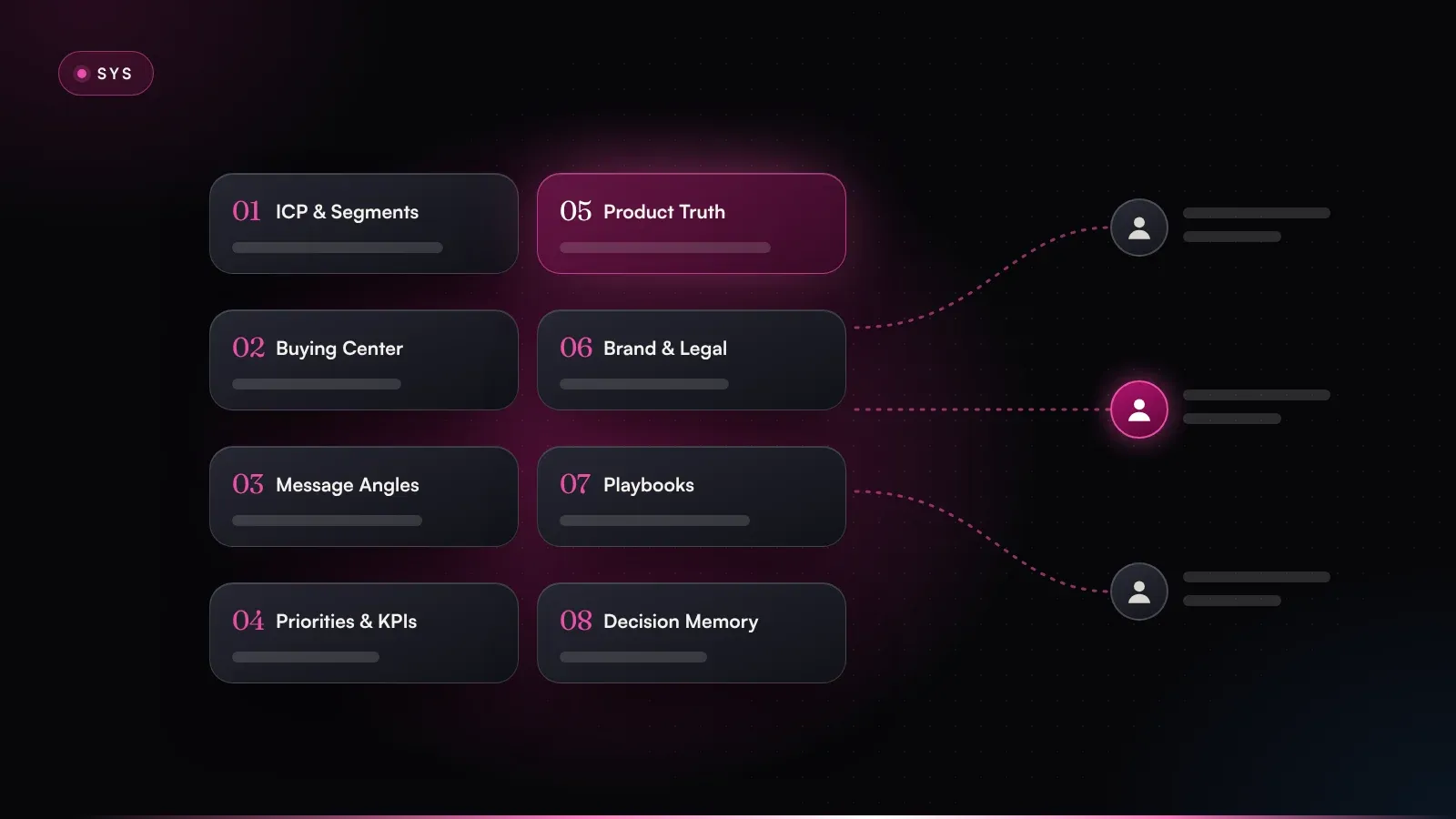
Eight modules have proven themselves in my work with sales-led B2B SaaS and AI companies. There's nothing magic about the number eight. Each module answers a different question, has a different owner and changes at a different pace, and that's the reason to keep them apart. What gets maintained together lives together, and what has different owners gets its own module.
- ICP & segmentsRevenue lead · quarterly
- Buying centerRevenue lead · quarterly
- Message anglesMarketing lead · every 8 weeks
- Priorities & KPIsLeadership · every 90 days
- Product truthProduct · every release
- Brand, claims & legalMarketing lead · twice a year
- Playbooks & rulesRevOps · monthly
- Decision memorySystem · every go and no
Each module answers a different question and has its own owner and update cadence. Every agent reads from the same source.
| Module | Owner | Update cadence | Read by |
|---|---|---|---|
| 01 ICP & segments | Revenue lead | Quarterly and after win/loss reviews | Signal, Paid Media, Pipeline Reporting, Outreach Routing |
| 02 Buying center | Revenue lead | Quarterly | Signal, Angle & Content, Outreach Routing |
| 03 Message angles | Marketing lead | Angle review every 8 weeks | Angle & Content, Paid Media, Outreach Routing, Product Truth |
| 04 Priorities & KPIs | Leadership | Every 90 days, thresholds in the weekly | Signal, Paid Media, Pipeline Reporting |
| 05 Product truth | Product | With every release | Angle & Content, Product Truth, QA & Brand Guard |
| 06 Brand, claims & legal | Marketing lead | As needed, reviewed twice a year | Angle & Content, Outreach Routing, Product Truth, QA & Brand Guard |
| 07 Playbooks & rules | RevOps | Monthly review | Signal, Paid Media, Outreach Routing, Inbox & Ops |
| 08 Decision memory | System | Continuously, with every go and no | Pipeline Reporting, Inbox & Ops |
The agent mapping is a starting point, and you'll adjust it later. What matters is that it's documented. Each agent reads only the modules its role requires, which keeps the context lean and shows you instantly which agents a change affects.
For each module, here's what it's for, plus a filled-in example entry. All examples come from one fictional company: a vendor of maintenance planning software selling to mid-sized manufacturers, with an ACV of around €40,000. Every number is an example and not a benchmark. So take the structure and write your own content into it.
Every entry has the same header: file, version, owner, date, status. It looks bureaucratic, I know. But it's the only way an agent can later tell you which version its statement is based on.
01 ICP & segments
Who you sell to, and who you don't. The exclusion criteria matter more than the wish list, because an agent that doesn't know who you don't want wastes research, budget and credibility. Every criterion needs evidence from win/loss data. Without it, it's an opinion.
Segment A (tier 1)  Manufacturing, 200–2,000 employees, DACH
  Fit signals       own maintenance team, ≥ 3 sites, SAP ERP
  Evidence          majority of won deals 2025/26 (win/loss review Q3)
Segment B (tier 2)  Food production, 100–500 employees
  Fit signals       audit pressure (IFS), paper maintenance logs
Exclude             < 100 employees: sales cycle too long for the ACV
                    sales subsidiaries without their own production
                    customers of reseller P-2 (contract clause)
Status: live · next review: Q1 2027
02 Buying center
The three to eight roles per deal: what they want, what slows them down, what proof they need and how they buy. Derive the model from won and lost deals. A persona workshop is no substitute. How agents use it for account research is covered in buying committee research with AI agents.
Role           champion in most won deals
Recognized by  owns equipment uptime – not by job title
Pain           unplanned downtime, know-how stuck in a few technicians
Objection      “My team won't maintain yet another system.”
Proof          plastics processor case study (approval C-04)
Buys through   plant management (budget), IT (integration), purchasing
Status: live · owner: revenue lead
03 Message angles
An angle isn't a slogan. It's a precise bet: 1 angle = 1 segment. It describes the persona, the use case, today's workaround, your edge and the outcome. Every angle has a status (live, testing or retired). Without a status, an agent will happily keep writing with an angle you buried two months ago. How angles turn into concrete messages is the subject of from signal to message.
Segment      B · food production
Persona      head of quality and maintenance
Use case     maintenance records for the IFS audit
Workaround   spreadsheets and paper logs, back-filled before the audit
Edge         proof per machine at the push of a button, no gaps
Outcome      audit prep in hours, not days (case C-12)
Status       testing since 2026-09-01 · review on 2026-10-27
04 Priorities & KPIs
The few levers for the next 90 days, targets, score thresholds and the SLAs between marketing and sales. This module tells agents what matters right now and, above all, what doesn't. Without priorities, every agent optimizes its own sub-goal. In the end everything is a little better, and nothing has moved.
Lever 1      segment A, 60 tier-1 accounts · target: 18 SQLs
Lever 2      validate angle A-07 · go/no-go on 2026-11-30
Stopped      generic webinar series, trade show leads without ICP fit
Thresholds   score ≥ 70 → sales handoff · 50–69 → retargeting
SLA          sales responds to a handoff within 1 business day
KPIs         tier-1 pipeline · sales velocity · time to first meeting
With these four modules, the revenue logic is in place, and signal, content and paid media agents can already do meaningful work with it. Provided, of course, that what they say is true. That's what part 2 is about.
The 8 modules with a template, part 2: truth, rules and memory
The first four modules describe market and message. With the next four you make sure the message is accurate, gets executed by the rules, and that the system learns from every decision.
05 Product truth
What the product can do today. Roadmap promises don't belong here. It holds doc excerpts, release notes, pricing logic, approved proof points and case studies. The owner is product, and that's deliberate. The Product Truth Agent checks website and campaign copy against this module every week and turns contradictions into concrete correction proposals.
Status        available since release 4.8 (2026-09-15)
May say       “capture work orders without a connection and
              sync them later”
Don't say     “fully usable offline” – reports need a connection
Pricing       included in all plans
Evidence      release notes 4.8, product docs (internal)
Valid until   next major release
06 Brand, claims & legal
Tone of voice, wording rules, forbidden claims and compliance requirements, which together form the guardrails for everything that goes live. Your channel and outreach rules live here too, the ones you've agreed on with data protection and legal. The QA & Brand Guard Agent checks every draft against them before it reaches a human.
Tone           clear, technical, no superlatives
Address        informal on LinkedIn, formal in emails
Forbidden      “guaranteed”, “100% failure-proof”, “replaces technicians”
Required       customer quotes only with an approval ID from the case register
Comparisons    never name competitors in ads
Outreach       first-touch email only under channel rule K-03
Legal review   2026-07 · next review 2027-01
07 Playbooks & rules
Routing rules, activation thresholds, sequences and approved data sources, plus the routines you approved once. Every rule gets an ID so an agent can state in the change log which rule it acted on. Anything listed here as an approved rule may run at level L3 without an individual go; everything else stays a proposal.
Trigger      opportunity created OR reply from a contact at the account
Action       end running sequences at the account, notify the owner
Agent        Outreach Routing · level L3 (approved rule)
Approved     RevOps, 2026-08-12
Reason       double outreach at three accounts (see D-2026-08-09-01)
Check        monthly: number of triggers in the change log
08 Decision memory
Every proposal, every go and every no, each with the reason, before/after and the result. The system writes this module itself, and humans supply the reasons. To me it's the most underrated module of all, because without memory an agent will propose next week exactly what you rejected yesterday.
Proposal     budget for campaign A-07 +30%
Agent        Paid Media · level L1 (propose)
Decision     no · leadership
Reason       angle still testing – scale only after go/no-go on 2026-11-30
Follow-up    rule candidate: no budget increases for angles in testing
Result       open · review in the weekly, week 45
Line up these eight examples and you have the template: eight files with a fixed header, defined fields and a status. A first version doesn't need more than that.
Structure, versions and approvals: how the knowledge base stays current
The best module structure is worthless if the content is spread across five tools and nobody knows which version is current. Four principles keep the knowledge base usable.
One source of truth
Every piece of information exists only once. If pricing lives in product truth, it doesn't also live in the brand module and three prompts; other modules point to it. That sounds trivial, and yet in practice maintaining the same thing twice is the most common source of contradictions.
Files, versions, owners
I set up the knowledge base as Markdown and YAML files in a repo or workspace that you own, separate from the model. Markdown because humans can read and edit it, YAML for anything agents evaluate as a threshold or rule. Every change gets a version, an owner and a date. With Git that's built in; in Notion or SharePoint it takes discipline (which, in my experience, is the first thing to slip). Because the files are open, the system also stays model-agnostic.
knowledge-base/
├── 01-icp/              icp.md, exclusions.yaml
├── 02-buying-center/    roles.md, objections.md
├── 03-angles/           A-01.md … A-09.md, status.yaml
├── 04-priorities/       q4-2026.md, thresholds.yaml
├── 05-product-truth/    features/, pricing.md, proof-register.md
├── 06-brand-legal/      tone.md, claims.md, channel-rules.md
├── 07-playbooks/        routing.yaml, rules/R-01.md … R-14.md
├── 08-decisions/        decisions.log
└── CHANGELOG.md
Decision memory instead of hallway talk
Every rejection needs a reason, and the reason goes into module 08. When the same reason shows up three times, it's a candidate for a rule in the playbooks or a correction in another module. That's how corrections turn into knowledge, and you stop making the same correction every week.
Updates only after a go – including the knowledge base itself
Agents are often the first to notice that something has changed: a new release, an angle that's stopped working, a threshold that triggers too many false handoffs. So they're allowed to propose updates, with before/after and a list of affected assets. The decision belongs to the module owner.
- 01TriggerRelease, a no, a new signal
- 02ProposalAgent, before/after (L1)
- 03CheckConflicts, evidence, impact
- GOOwner's goModule owner decides
- 05New versionChange log, date, owner
- 06All agents followthe same day
Agents spot and draft updates, the module owner decides. After the go, every agent works with the new version the same day.
This is how such a proposal looks when a new release overtakes the claim from module 05:
Trigger       release notes 4.9: reports now work offline too
Agent         Product Truth · level L1 (propose)
Module        05 product truth · offline-mode.md v4.8 → v4.9
Before        Don't say: “fully usable offline”
After         May say: “work orders and reports without a connection”
Affected      angle A-07, landing page /audit, 2 live ads
Check         QA & Brand Guard: claim backed by docs, no conflict
Waiting for   go from product · then follow-up proposals to marketing
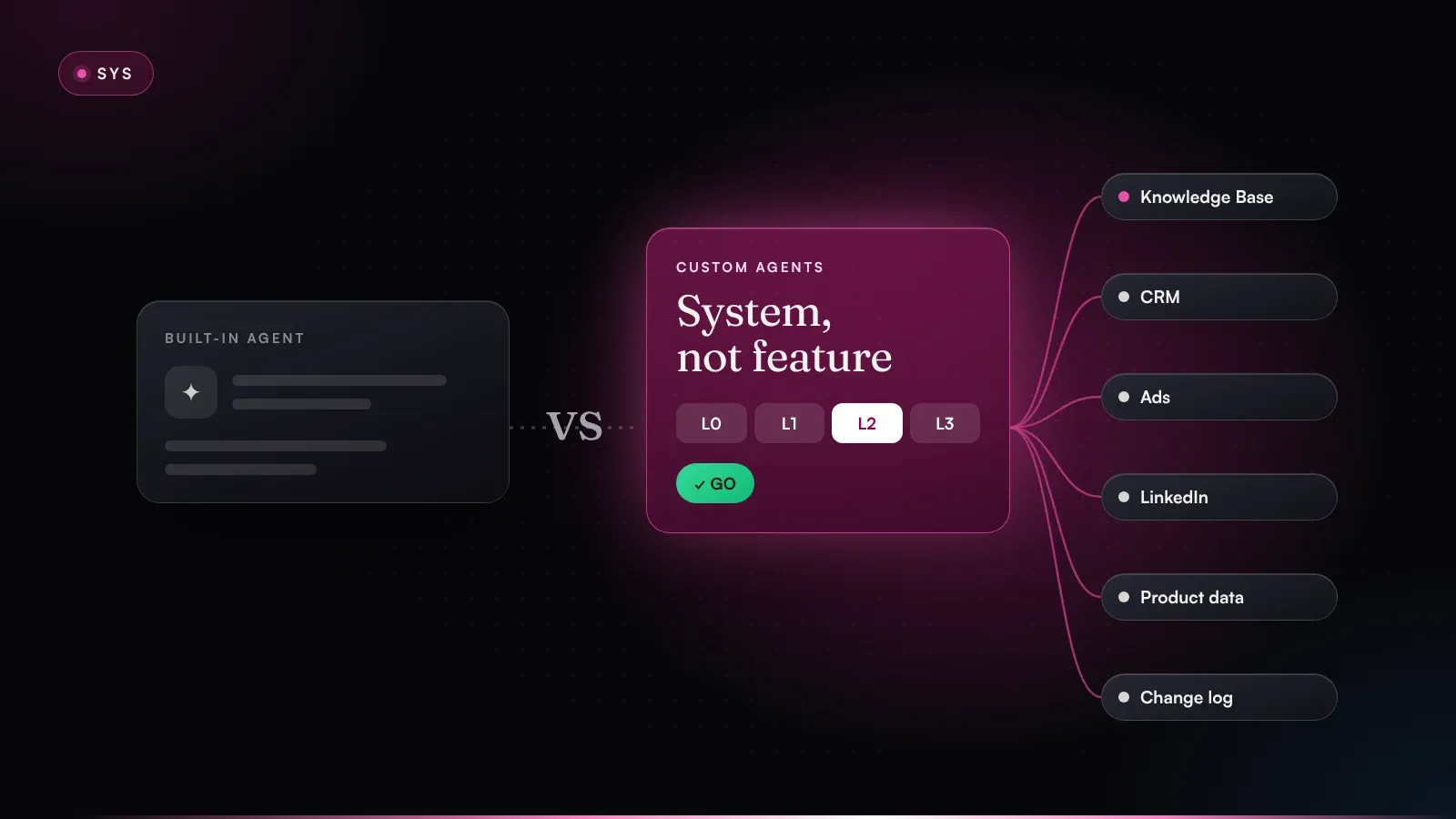
The division of labor looks like this: agents spot the change, draft the update, check for conflicts and enter the approved version into the file. Whether it applies is up to humans. On the permission ladder, that means proposals at L1 and writing after a go at L2. For knowledge base content I don't use L3 at all. The only thing the system writes itself is decision memory, because it only documents and decides nothing.
Data isn't instructions. Whatever agents read in emails, chats or on web pages never becomes a rule unchecked. Rules come only from the knowledge base, and only with the owner's go.
Add a fixed cadence on top: in the weekly pipeline review you check thresholds and open update proposals, every eight weeks the angles, every 90 days priorities, ICP and buying center. Permissions, data flows and logging are covered in detail on the security & governance page.
How do agents use the knowledge base – load it all or retrieve what they need?
A common reflex goes like this: just give the agent everything. Modern models have huge context windows, so the whole knowledge base fits. That works worse than you'd think. The study Lost in the Middle by Liu and colleagues showed that, in their tests, language models used information at the beginning and end of a long context far more reliably than information in the middle. Anthropic describes the same principle from practice in its piece on context engineering for AI agents: context is a finite budget, and the goal is the smallest set of high-signal information.
So more context isn't automatically better. In practice I work with two modes and combine them; searching an index is a variant of the second:
| Mode | How it works | What I use it for | What to watch out for |
|---|---|---|---|
| Load in full | The module sits in the context in full on every run | Small, always-needed modules: brand rules, priorities | Modules grow unnoticed and key points get buried |
| Retrieve selectively | The agent sees a table of contents and opens only matching entries | Large modules: product truth, case register, decision memory | Without good titles and descriptions it can't find the entry |
| Search an index | Content is indexed up front and found by similarity | Very large collections, e.g. product docs with hundreds of pages | Hits look relevant but may be out of date |
Selective retrieval is the same pattern Anthropic calls progressive disclosure in its Agent Skills: the agent first sees only a name and a short description and loads the full content only when it needs it. For your knowledge base, that means in practice:
- Every module gets an index file with one line per entry: ID, title, status, a one-sentence description.
- The prompt defines what's always loaded and what's loaded on demand. The QA & Brand Guard Agent always loads brand & legal in full, while the Angle & Content Agent opens only the one angle it's working on.
- Entries marked retired disappear from the agents' index but stay traceable for humans.
- Every output names its source, e.g. “claim from product truth, offline-mode.md v4.8”. When something goes wrong, you can see right away whether the agent misread or the knowledge base is wrong.
For most marketing teams, a folder structure with good index files is enough to start, unspectacular as that sounds. Dedicated search infrastructure only pays off once the collection is so large that a table of contents is no longer manageable.
Which metrics show that your knowledge base is working?
A knowledge base isn't a documentation project that's done once every field is filled in. It's working when agents deliver better work with fewer corrections and strategy changes reach execution faster. You can measure that.
| Metric | What it measures | Warning sign |
|---|---|---|
| Correction rate | Share of agent drafts changed in substance before the go | Doesn't drop after week four |
| Recurring rejection reasons | Reasons that repeat in decision memory | They never become rules |
| Freshness per module | Days since the last review versus the agreed cadence | Modules past their review date |
| Contradictions | Conflicts between modules or with live copy | Rise after every release |
| Time to execution | Days from a strategy decision until every agent works by it | More than one day |
| Pipeline from knowledge-base plays | Opportunities from campaigns and outreach built on documented angles | Lots of output, few opportunities |
In the first weeks, the correction rate is the number to watch. Every recurring correction points to a gap in the knowledge base. In the end, though, the knowledge base is measured on pipeline too. Activity isn't impact. Pipeline is impact. To tie marketing's contribution to how fast your deals move, read sales velocity as a marketing KPI.
Common mistakes when building an AI marketing knowledge base
Migrating the wiki instead of making decisions
The most common mistake is copying every existing document into the new structure. Afterwards you have the same contradictions in a new place. A knowledge base is built through decisions about which segment is in, which claim holds and which angle is retired. Moving files around makes none of them.
Duplicating knowledge in prompts just to be safe
“Just so the agent really knows,” someone says, and the pricing ends up in the prompt one more time. The next time prices change, you have two truths. Prompts point to modules; they don't repeat them.
Modules without an owner
A module nobody owns goes stale. It takes a while, and it happens reliably. Every module needs a named person who approves updates and keeps the review date.
No status per entry
Without live, testing and retired, an agent can't tell what applies. Buried angles and discontinued features then live on in new copy.
Agents writing straight into the knowledge base
It's tempting to let agents maintain their own knowledge. But sooner or later the system adopts something from an email or a web page as a rule. Agents propose, owners decide. I don't make exceptions there.
How to build your AI marketing knowledge base in four weeks
You don't need six months. Four weeks are enough for a first version that two or three agents can do productive work with. It only matures once it's in use.
- Week 1Inventory & ownersReview sources, 8 owners
- Week 2Revenue logicModules 01–04 from win/loss
- Week 3Truth & rulesModules 05–08, claims, rules
- Week 4Test with agentsSlim prompts, measure
Revenue logic first, then truth and rules, then a test with agents. The knowledge base matures in operation.
Week 1: inventory and owners
Collect what already exists: prompts, decks, positioning papers, battlecards, brand guidelines, sales presentations. Assign an owner to each of the eight modules, decide where the knowledge base will live and set up the folder structure with a fixed file header. Don't transfer any content yet. First find out where your sources contradict each other.
Week 2: the revenue logic (modules 01–04)
Take your last ten to twenty won and lost deals and derive the ICP with exclusion criteria and the buying center from them. Write down the two or three angles that are currently running, with a status. Leadership sets the levers and thresholds for the next 90 days. It's the week with the most uncomfortable decisions, and also the most important one.
Week 3: truth, rules, memory (modules 05–08)
Product delivers product truth for the features you talk about in the market. Marketing and legal define claims, forbidden wording and channel rules. RevOps documents the first routing rules, each with an ID. Decision memory starts as an empty log with a fixed format.
Week 4: test with agents
Have two or three agents do the same tasks with the knowledge base that previously ran on individual prompts. Compare the results, measure the correction rate and strip the business knowledge out of the prompts. At the end of the week, set the review cadence and decide which agent comes next.
- Eight modules set up, each with an owner and a review date
- ICP and buying center derived from at least ten won and lost deals
- Every angle, feature and rule has a status and a version
- Forbidden claims and channel rules agreed with legal
- Prompts point to modules instead of repeating knowledge
- Update proposals only go through the owner's go
- Correction rate measured before and after the switch
My take
Don't start with the agent. Start with the knowledge base. That's the order I hold to in every project, and it's not up for negotiation. An agent without a knowledge base is a fast intern who never got onboarded: diligent, confident and regularly wrong.
To be honest, the hard part isn't the technology. Markdown files in a repo take an afternoon. The hard part is the decisions a knowledge base forces on you: which segment don't you want? Which angle is dead? Which claim is nobody allowed to use anymore? If your team can't agree on that, no agent can either. Most marketing problems are actually system problems, and a knowledge base drags them into the light.
For the start, this is enough for me: the four revenue-logic modules done thoroughly, the other four as a rough first draft. Better 80 percent, versioned and owned, than 100 percent in a document that never gets finished. Operations take care of the rest, because every no with a reason makes the next version better.
Agents do the work. Humans make the decisions. The knowledge base is where those decisions apply to every agent.
You can build all of this yourself with the templates above and a folder in your workspace. If you'd rather set it up with me, the knowledge base is the first thing I build on the Build path, before any agent. And if you want to know where your knowledge sits today and what to tackle first, book a free 30-minute diagnosis call and we'll look at it together.
Frequently asked questions
What is an AI marketing knowledge base?
An AI marketing knowledge base is a structured, versioned collection of the knowledge agents use to do marketing work: ICP, buying center, message angles, priorities, product truth, brand and legal rules, playbooks and a decision memory. It's the shared source every agent works from. Each module has a human owner who approves changes.
What's the difference between a knowledge base and a prompt?
The prompt describes an agent's role: its task, working steps, output format and which modules it reads. The knowledge base describes the business: what's true, what applies and what's been decided. Rule of thumb: if an agent needs to know it to do its job well, it belongs in the knowledge base, not in the prompt.
What should a marketing knowledge base for AI agents include?
Everything several agents need over a longer period: target segments with exclusion criteria, buying center roles, message angles with a status, priorities and thresholds, product facts and approved claims, brand and legal rules, routing rules and every decision with its reason. Live data such as campaign performance or account data stays in your CRM and ad accounts and is read there.
What format should a knowledge base for AI agents use?
Markdown works well for content humans read and edit, and YAML for rules and thresholds agents evaluate. The files live versioned in a repo or workspace your company owns, separate from the AI model. Every entry has a fixed header with version, owner, date and status.
Do I need a vector database or RAG for my knowledge base?
Usually not at the start. Agents load small modules such as brand rules or priorities in full and retrieve larger ones selectively through index files. Search over a vector index only pays off for very large collections, such as extensive product documentation.
How long does it take to build a marketing knowledge base?
A usable first version takes about four weeks: inventory and owners, then the revenue logic from won and lost deals, then product truth, rules and memory, and finally a test with two or three agents. It's never finished, but it gets better with every go and every no that comes with a reason.

About the author
Mario Maier
AI-native revenue marketing engineer · founder of igromo
For more than 15 years I've worked at the intersection of marketing, sales and revenue operations, from early-stage setups to scale-ups with multi-stage sales cycles and large buying centers. Since 2019 I've measured my work on pipeline and revenue.
Where do you stand?
The agentic readiness check shows in 3 minutes how ready your marketing is for agents – and which gaps to close first.
Keep reading
All insightsSYS24 min read
AI agents for B2B marketing: the complete guide from first prompt to pipeline
AI agents for B2B marketing that move pipeline: definition, architecture, 8 core agents with workflows, what not to automate, KPIs and a 90-day plan.
SYS18 min read
HubSpot Breeze agents vs. custom AI agents: what's enough, and when?
HubSpot Breeze agents or custom AI agents? My take on the 2026 product state: where Breeze is enough, where it isn't – with a matrix, test checklist and plan.
SYS21 min read
GTM engineering: what a GTM engineer does – and when you need one
What a GTM engineer does, how the role differs from RevOps, when to hire one and when AI agents cover the work. With a decision matrix and a 90-day example.