AI agents for B2B marketing: the complete guide from first prompt to pipeline
AI agents for B2B marketing have arrived in many teams. So far they've mostly moved output, and pipeline has barely noticed. This guide explains what an agent is, why AI tools without a system fail, what an architecture of knowledge base, agents and human go looks like, what the eight core agents do day to day, and how to get from prompts to a system in 90 days.
 ByMario Maier
Published 24 min read
Contents
- Why more AI output doesn't mean more pipeline
- What are AI agents for B2B marketing – and what aren't they?
- Why AI tools without a system fail
- The architecture: knowledge base, agents, human go, change log
- The 8 core agents for B2B marketing – one workflow each
- Example: a Tuesday morning inside the system
- What you shouldn't automate
- Build, buy or platform agents?
- How do you measure whether AI agents for B2B marketing work?
- The 90-day roadmap: Build or Repair
- My take
Why more AI output doesn't mean more pipeline
Marketing leaders rarely ask me anymore whether they should use AI agents for B2B marketing. The question I hear most right now is a different one: why hasn't our pipeline moved, even though we've been working with AI for ages? Posts get written in minutes, a landing page in an hour, ad variants by the dozen. Output went up, and pipeline stayed flat.
When I look under the hood, I see the same picture in project after project. Ten people, ten prompts, ten versions of your positioning. The ICP, proof points and pricing logic are scattered across decks, docs and chat threads, so there's no place an agent could work from. Whether an AI output ever touched an opportunity is something nobody measures.
Adding more speed on top doesn't fix any of that. It multiplies the inconsistency.
Output ↑. Pipeline →.
This guide is my attempt at the opposite. It covers what an AI agent in B2B marketing is (and isn't), why AI tools without a system fail, and what the architecture of knowledge base, agents, human go and change log looks like. The biggest part is about the eight core agents of RevPrime®, the agentic marketing operating system, each with a typical workflow. After that come limits, maturity levels, build vs. buy vs. platform, metrics and a 90-day roadmap. Almost every section has its own, deeper article, and I link to it where it fits.
What are AI agents for B2B marketing – and what aren't they?
The label now gets stuck on almost anything with a language model somewhere inside, which makes decisions hard. I stick to a sober definition. An AI agent is a system that pursues a goal, plans its own next steps, uses tools (meaning it reads data and writes into your systems) and checks its result before it moves on.
Anthropic draws a similar line in its guide Building effective agents: workflows follow predefined code paths, while agents dynamically direct their own process and tool use. For marketing, that's a useful distinction because it shows where agents differ from what you already run.
| Type | What starts it? | How does it decide? | What happens in the end | B2B marketing example |
|---|---|---|---|---|
| Marketing automation | a trigger, such as a form fill | a fixed if-then rule | the same path every time | A workflow sets the lifecycle stage and starts a nurture track |
| Chatbot | a visitor's question | answers within a conversation | an answer, not an action | Website chat answers questions about integrations |
| Copilot | you, with a prompt | helps with the task you're doing right now | a draft you take over | An email draft or a summary in Claude or ChatGPT |
| AI agent | a goal, a cadence or a signal | plans steps, uses tools, checks the result | a proposal – and after a go, the change in the tool | The Paid Media Agent checks campaigns daily and shifts budget after a go |
Two things in that table matter to me. First, an agent isn't automatically better than automation. If a process always runs the same way, an if-then rule is cheaper and faster, and it's easier to audit. In the same piece, Anthropic recommends finding the simplest solution possible and only adding complexity when it's needed. I'd sign that without hesitation.
Second, the copilot is what most teams experience as “AI in marketing” today. It makes individuals faster, but it doesn't turn their work into a system. Agents pay off where work recurs without looking the same every time: scoring signals, watching campaigns, checking copy against product truth or condensing reports so someone can make a decision. In sales-led B2B teams, that's the bulk of operational marketing work.
Agents don't replace strategy. They aren't autonomous employees emailing customers without oversight either, and if you're looking for a tool you buy and then leave to run on its own, they'll disappoint you.
Why AI tools without a system fail
My most important sentence on this topic is short: AI without a system just produces the wrong thing faster.
I have nothing against tools; I use them every day. But a tool speeds up a task, and most marketing problems are system problems at heart: unclear priorities, an ICP everyone reads differently, message angles without a status, reporting with no link to pipeline, no defined owners between marketing and sales. A faster tool changes none of that. At best it makes the problems visible sooner, or expensive sooner.
I'm not alone in this. Gartner predicts that over 40% of agentic AI projects will be canceled by the end of 2027 due to escalating costs, unclear business value or inadequate risk controls. In the same release, Gartner warns of “agent washing”: existing products rebranded as agents without substantial agentic capabilities. Read those three reasons again and you more or less have the list of what's missing without a system, which is a link to revenue, governance and a bounded scope.
AI tools without a system
- Everyone prompts differently
- Knowledge in decks and heads
- Output gets counted
- Unclear what went live
Agentic system
- One knowledge base for all
- Agents with a role and cadence
- Human go before external effect
- Measured on pipeline
Tools speed up tasks. A system points them at pipeline – with shared knowledge, clear roles and a go before anything with external effect.
In practice, AI initiatives in marketing tend to get stuck in the same places. Knowledge has no home: ICP, buying center, claims and pricing logic sit in prompts, slide decks and individual heads, so every person and every agent works with a different truth. Output has no target, because you measure what's easy to count (assets, posts, variants) while nobody knows whether any of it touched an opportunity.
The third pattern is the nastiest, because it can go wrong in both directions. Either the agent isn't allowed to do anything, and it stays an expensive copilot. Or it's allowed to do too much, and the first mistake with external effect ends the project.
Agents amplify what's there: clarity as much as chaos. Your agents will never be better than your knowledge base.
Five maturity levels: from prompts to a system
Where are you today? Most teams I talk to sit at level 1 or 2 and want to jump straight to level 4 with one more tool. That doesn't work, because every level builds on the one before.
| Level | What it looks like | Typical symptom | Next step |
|---|---|---|---|
| 0 · Individual prompts | Everyone prompts on their own, with their own context | Ten versions of your positioning | Collect the knowledge and name owners |
| 1 · Shared prompts | Templates, custom GPTs or projects per team | Knowledge copied into every prompt, stale within weeks | Pull the knowledge out of prompts into a knowledge base |
| 2 · Knowledge base | ICP, angles, claims and rules versioned in one place | Consistent output, but triggered by hand every time | Two or three agents on a fixed cadence |
| 3 · Agents with human go | Agents read, propose and write after a go | Approvals pile up when rules are missing | Approve routines as rules, introduce a weekly |
| 4 · Agentic system | Core agents plus custom ones, change log, decision memory | The system learns from every no | Expand – measured on pipeline |
The biggest jump is from level 1 to level 2, and it's unglamorous because it looks like documentation. Only from there on, though, do people and agents work from the same truth. How to build that knowledge base, which modules it needs and how it stays current is covered in depth in my article on the AI marketing knowledge base. To see where your team stands today, take the agentic readiness check. It takes a few minutes.
The architecture: knowledge base, agents, human go, change log
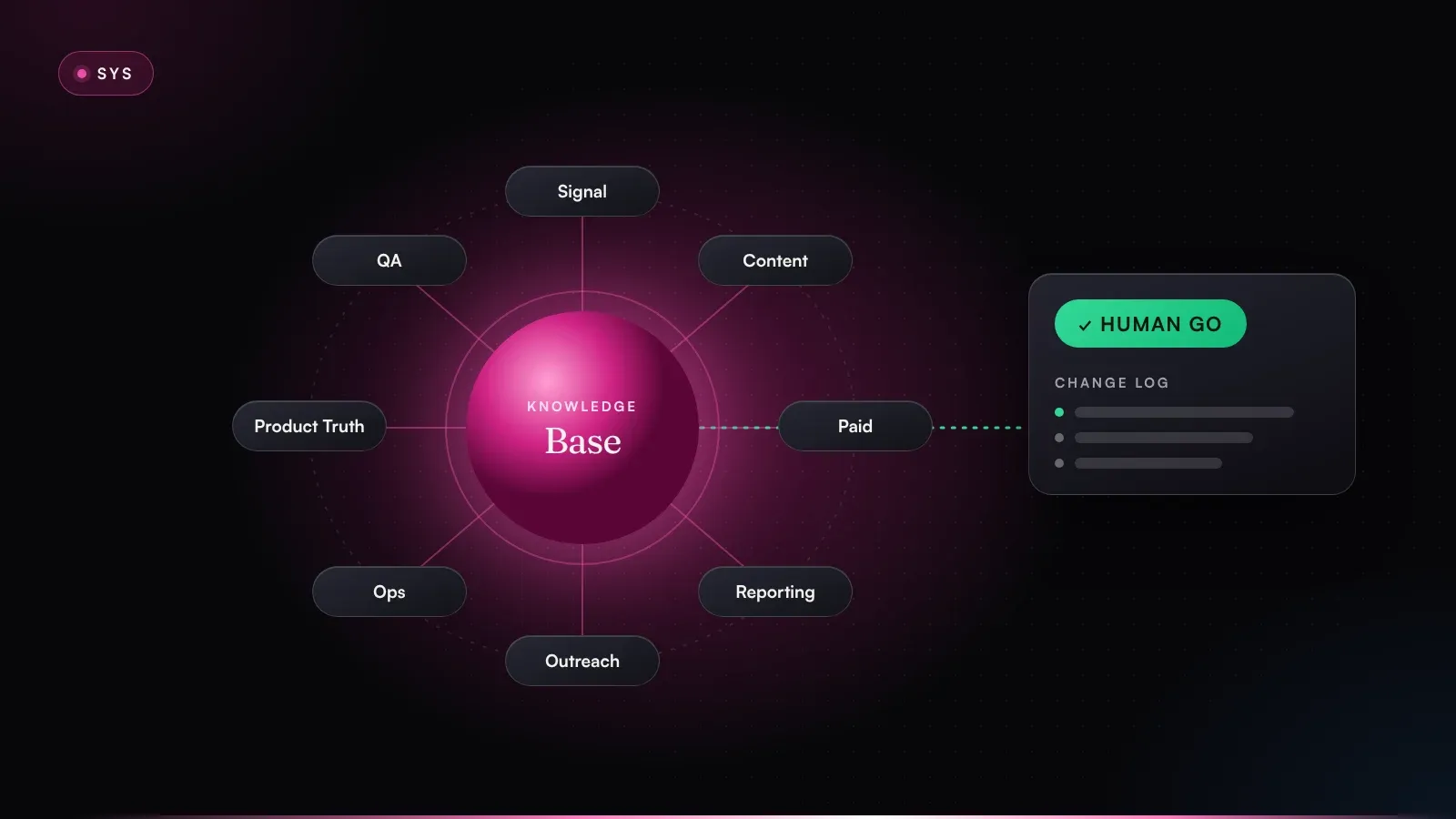
An agentic marketing system has four load-bearing parts, plus the data it works on. The order isn't cosmetic: let agents loose without a knowledge base, or let them write without a human go, and you build yourself the very problems so many projects die from.
- 01Signals & dataCRM, ads, web, intent, product
- 02Knowledge base8 modules, versioned, with owners
- 03Agents8 core agents plus your own
- 04Human goPermission ladder L0 to L3
- 05Change logExecute in the tool, before/after
From data to change log: agents work from the knowledge base, and anything with external effect goes through a go.
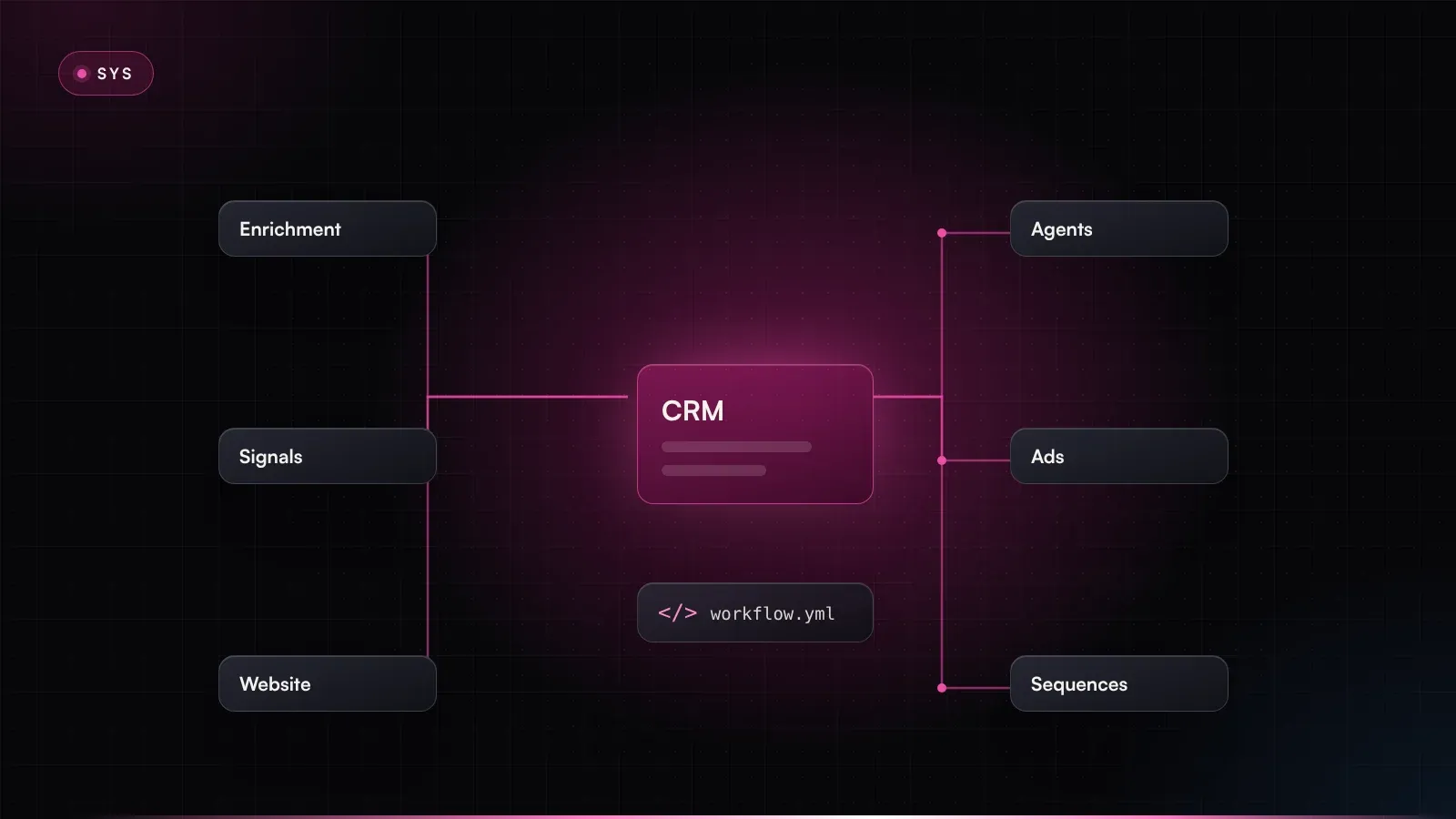
Signals and data. CRM, ads, web analytics, intent data, product docs, approved inboxes. The agents read where your team already works. Nobody needs a parallel universe that sales never opens.
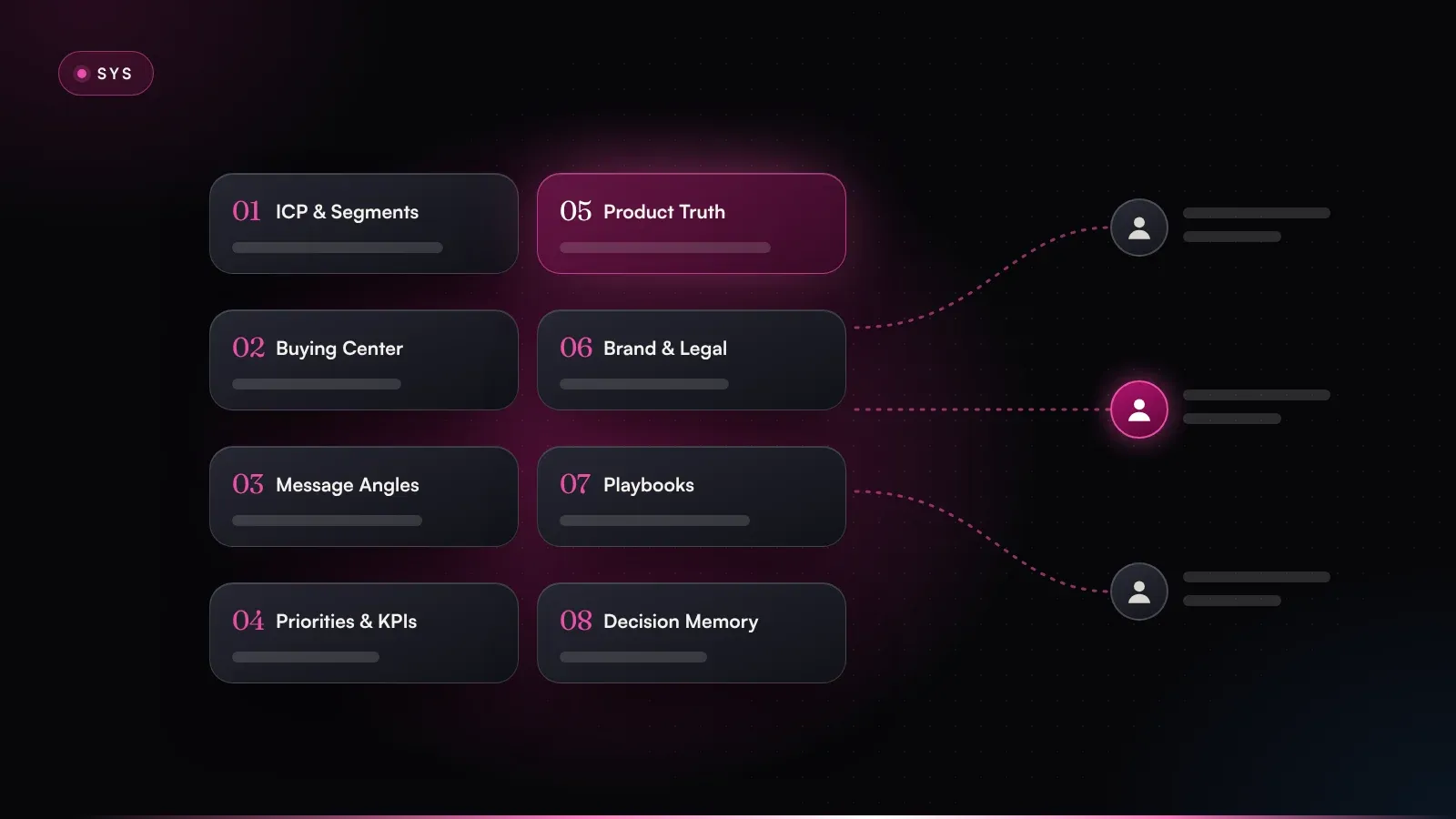
The knowledge base at the core. Eight modules: ICP & segments, buying center, message angles, priorities & KPIs, product truth, brand, claims & legal, playbooks & rules, and decision memory. Every module has a human owner. Agents don't carry their own knowledge; they read it there. So a new agent is productive from day one, and a change in strategy reaches every agent the same day. The details are in the section on the RevPrime® knowledge base.
Rule of thumb: if an agent needs to know something to do its job well, it belongs in the knowledge base and not in its prompt.
The agents. Several specialized roles beat one super-agent. Every agent has a job, a cadence and an output it's measured on, much like a good team member. They all follow the same pattern: read, analyze, propose, go, execute, log.
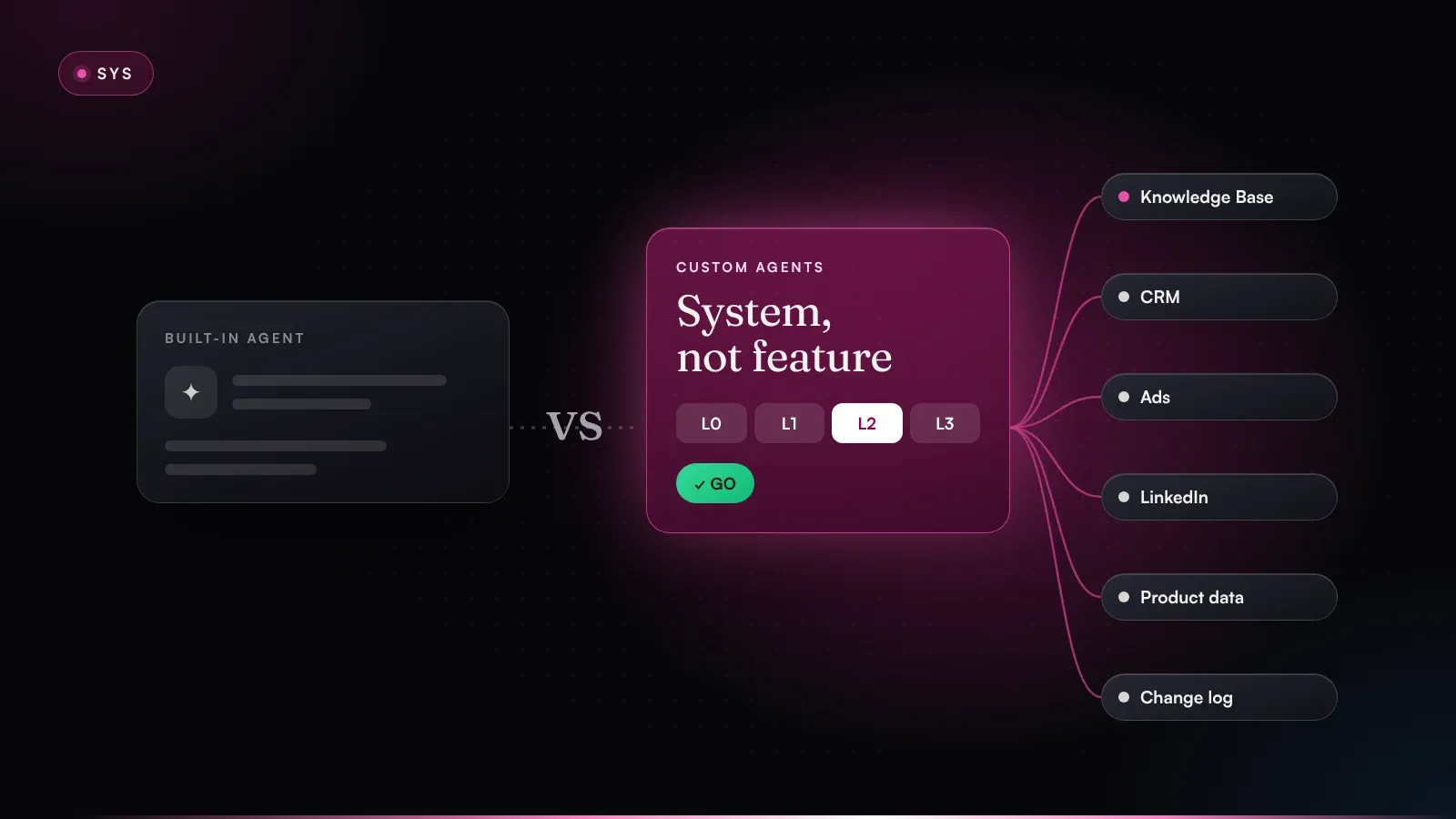
Human go. The line between agent and human isn't drawn by what an agent is capable of. It's drawn by external effect. In RevPrime®, a four-level permission ladder governs this:
- L0 · Read: agents read CRM, ads, web and docs for the analysis.
- L1 · Propose: numbered proposals with effect, risk and checkpoint; nothing changes in the tool.
- L2 · Write after go: after a single go, the agent writes the change straight into the tool and logs it.
- L3 · Approved rule: narrowly scoped routines, approved once and revocable at any time, such as CRM notes or audience upkeep.
Change log. Every change with before/after, reason, approval and timestamp. When someone rejects a proposal, the reason flows into decision memory and the next proposal gets better. It's also the answer to the question leadership and IT rightly ask: who changed what, and when? Permissions, data flows and logging are covered on the security & governance page.
Agents do the work. Humans make the decisions.
Something many architecture diagrams leave out: content from emails, chats or web pages is data, even when it's phrased like an instruction. An agent that reads inboxes and third-party websites must never turn that content into a command or a rule unchecked. Together with limited tool permissions and approvals, that's one of the most important safeguards against prompt injection.
Because the knowledge base, playbooks and approvals live separately from the model, the system is model-agnostic by design. I use Claude by default myself. Switching models still isn't a single click: tool support, permissions and reliability differ, so every combination gets tested for the specific deployment.
The 8 core agents for B2B marketing – one workflow each
The eight core agents cover the work almost every sales-led B2B team has. They're a starting point, more get added depending on the business, and nobody starts with all eight at once anyway. Below is each one with its job and a typical workflow; the short version lives in the RevPrime® agent catalog.
- Signalcontinuous · priorities
- Angle & Contenton demand · assets
- Paid Mediadaily · hypotheses
- Pipeline Reportingweekly · decision brief
- Outreach Routingdaily · lists & tracks
- Inbox & Opstwice daily · tasks
- Product Truthweekly · discrepancies
- QA & Brand Guardtwice daily · health report
Every agent reads from the same knowledge base. Custom agents plug in the same way – as a new role, not a new tool.
| Agent | Cadence | Output | Highest permission level |
|---|---|---|---|
| Signal Agent | continuous | Account priorities & next best action | L3 · Approved rule |
| Angle & Content Agent | on demand | Review-ready assets | L2 · Write after go |
| Paid Media Agent | daily | Findings & hypotheses to approve | L2 · Write after go |
| Pipeline Reporting Agent | weekly | Decision brief for the weekly | L1 · Propose |
| Outreach Routing Agent | daily | Clean, prioritized outreach lists | L3 · Approved rule |
| Inbox & Ops Agent | twice daily | Up-to-date task list & timeline | L2 · Write after go |
| Product Truth Agent | weekly | Discrepancies & content opportunities | L1 · Propose |
| QA & Brand Guard Agent | twice daily | Health report with fixes | L2 · Write after go |
The permission level is a guideline for the maximum. Which level an agent gets per tool is set in the project. Many teams deliberately start with L0 and L1 only, which I think is sensible.
Signal Agent: from visit to next move
The Signal Agent condenses web visits, engagement, CRM activity and intent data into a score from 0 to 100 and decides which track an account belongs in: retargeting, outreach or sales hand-over. Workflow: a tier-1 account visits the pricing and integrations pages several times in one week, and two new contacts from the target department show up. The agent checks the account against your ICP and exclusion criteria, lifts the score above the defined threshold, writes a note with its reasoning into the CRM (that runs as an approved rule) and alerts the account owner with a proposed next step.
How fit, intent and timing combine into a score you can trust is covered in intent scoring with fit, intent and timing. How a signal becomes a message that doesn't sound like surveillance is the topic of from signal to message.
Angle & Content Agent: one angle, one set
This agent produces assets, and always for a specific message angle. An angle describes exactly one segment: persona, use case, today's workaround, your edge and the outcome. Workflow: a new angle gets the status “testing” in the knowledge base. The agent derives a landing page, three LinkedIn ad variants and a short email sequence from it. The QA & Brand Guard Agent checks claims and tone, you approve, and only then does anything go live. Content meant to be cited in AI answers is built the same way; more on that in content for AI answers.
Paid Media Agent: finding, hypothesis, checkpoint
The Paid Media Agent monitors campaigns daily: budget pacing, CTR and CPC drift, ad fatigue, wasted search terms. It separates the leads that count from vanity conversions. Workflow: a LinkedIn campaign shows falling CTR and rising frequency over 14 days. The agent proposes pausing one creative and shifting part of the budget to the stronger variant. The proposal states the expected effect, the risk and the date it will be measured. After the go, it makes the change in the ad account and logs it, and two weeks later the report shows whether the hypothesis held. The audiences behind those campaigns are best kept up to date by agents too; see self-maintaining ABM audiences.
Pipeline Reporting Agent: the weekly, prepared
It shows what marketing does for pipeline and revenue. Workflow: before every weekly, it pulls numbers from CRM, ads and analytics, compares them with the targets in the priorities & KPIs module and delivers a decision brief with traffic lights: what works, what doesn't, what needs a decision? It doesn't write into operational tools. It's there to get decisions made in the weekly, so nobody has to sit through slides being read aloud. Which metric tells you the most is the subject of sales velocity as a marketing KPI.
Outreach Routing Agent: the right contact in the right track
It routes accounts into owner 1:1, LinkedIn-first or sequence, and keeps contact data in order: valid email, role, region, duplicates. Workflow: the Signal Agent flags a hot account. The routing agent checks the contacts, merges a duplicate and proposes that the account executive reach out to the champion candidate personally, 1:1, with no sequence. As soon as sales takes over, it ends running sequences automatically. That's a safety rule that was approved once and has run quietly ever since.
How the roles at the target account get researched beforehand is covered in buying committee research with agents. How agents help sales bring more roles into a live deal is the topic of multithreading with agents and the sales enablement use case.
Inbox & Ops Agent: messages become tasks
A lot of marketing work drains away in inboxes and chats. Twice a day, this agent matches new information from email and chat against the project state and sorts out what's waiting on you and what's waiting on others. Workflow: an agency sends revised delivery dates, and sales asks in chat for a one-pager for a deal. The agent turns that into numbered proposals: adjust the timeline, create a task with an owner, send a follow-up question to the agency. Nothing is written without a go.
Product Truth Agent: never promise what the product can't keep
It matches product docs and release notes against website and campaign copy. Workflow: according to the release notes, a connector is now generally available, but the integrations page still calls it “beta.” Meanwhile, an ad promotes a feature that's only in the enterprise plan. The agent flags both contradictions as concrete correction proposals and marks the new feature as a content opportunity for the Angle & Content Agent. It only proposes; the owner approves the fix.
QA & Brand Guard Agent: check before someone else does
Twice a day, it checks everything that's live: broken links, mobile rendering, outdated numbers, forbidden claims and legal wording. Workflow: a case study has moved, three landing pages now link to nothing, and one page still shows last year's price. The agent delivers a health report sorted red and yellow, with a proposed fix per finding, and applies the fixes after a go. This is also where labeling and wording rules get enforced. What the EU AI Act means for marketing teams is the subject of the EU AI Act in marketing.
Custom agents: a new role, not a new tool
Because every agent works from the same knowledge base, adding another agent basically means adding a new role to the team: define it, connect it to your stack, go live with a human go. Typical examples include webinar and event follow-up, competitor and pricing intel, expansion and churn signals, SEO and GEO visibility, partner and channel, RFP and security questionnaires, localization and review platforms. Most teams start with two or three agents; fully built out, it's 8 to 20+, depending on the business. Every new agent I build starts with a spec sheet:
Role:          Turns attendance and questions into the next sensible step
Cadence:       24 h after every event, then weekly for 3 weeks
Reads (L0):    Attendee list, chat questions, CRM history, signal score
Works from:    ICP, buying center, message angles, playbooks
Proposes:      Follow-up per segment, hand-over of hot accounts to sales
Writes:        CRM note on attendance (L3 · approved rule)
               Follow-up emails and sequences (L2 · only after go)
Stop rule:     No follow-up on objection or open deal
Measured on:   Meetings and pipeline from event accounts after 30 days
Owner: Marketing leadExample: a Tuesday morning inside the system
A worked, fictional example shows how it fits together. Imagine a vendor of supplier quality software selling to manufacturers in the DACH region. ACV is around €50,000 and the sales cycle runs six to nine months. Marketing is a head of marketing plus one demand gen person, with two account executives on the sales side. Four agents have been running for two months: Signal, Outreach Routing, Paid Media and QA & Brand Guard. Product Truth joined three weeks ago.
Here's the log on a Tuesday morning:
07:02  SIG  Account 214 · automotive supplier, tier 1
            Score 46 → 78 · 3× pricing, 2× SAP integration page,
            2 new contacts from quality management
            → CRM note written (L3 · rule R-04)
            → Proposal #31: track sales hand-over · owner: AE South
07:06  OUT  Contacts at account 214 checked: 2 valid, 1 duplicate
            merged (L3 · rule R-07)
            → Proposal #32: 1:1 from AE to head of QM, no sequence
07:15  ADS  Campaign “Head of QM DACH” · CTR −31% in 14 days,
            frequency 6.2 · creative B3 fatigued
            → Proposal #33: pause B3, move 30% of budget to B1
              Expected: lower CPL · risk: low
              Checkpoint: in 14 days
07:40  TRU  Release notes 4.2: SAP connector generally available
            Integrations page still says “beta”
            → Proposal #34: correct integrations page
            → Content opportunity for ANG: angle “SAP without an IT project”
08:01  QA   Red: case study link (404) on 3 landing pages
            Yellow: outdated price on LP “Audit-Ready”
            → Proposal #35: redirect links, price from product truth

08:20  Go #33, #34, #35 · head of marketing
08:21  ADS  #33 executed · change log C-1182 (before/after)
08:24  QA   #35 executed · change log C-1183
09:10  Go #32 with edit · AE South: “Open with their supplier
            audit in May, not with SAP”
09:11  OUT  Draft updated · reason stored in decision memory
11:30  No #31 · AE South: “Account already runs through a partner”
            → Rule proposal: exclude partner deals from hand-over
What matters to me in this log: no agent did anything with external effect without a human agreeing. Only two routines ran without a single go, an internal note and a bit of data hygiene. The humans invested maybe a quarter of an hour between them, and in that time they contributed what no source contains, namely the date of the supplier audit and the partner already in the deal.
The no on #31 is worth a second look too. It isn't a system failure; it's the moment the system learns. The reason turns into a rule proposal, and the next account with a partner involved never lands in the hand-over track in the first place.
What this looks like over months in ABM is shown in the account-based marketing use case. For accounts that send signals but never fill in a form, the intent-based activation use case and the article on ungated inbound are the right next reads.
What you shouldn't automate
What agents can do is the less interesting question. What they should do matters more. I look at two axes for that: how often does the work repeat, and how much external effect does it have?
Repetition and external effect decide: approved rule, single go, copilot or a human alone.
Frequent work with no external effect, such as CRM notes, data hygiene or audience upkeep, can run on a rule approved once. For frequent work with external effect, like budgets, sequences and publishing, agents prepare and execution waits for a single go. Rare work with no external effect doesn't need an agent at all, since a copilot is enough. Rare work with high external effect stays with a human.
There are a few things I wouldn't delegate to agents, not even with a go:
- Positioning and ICP. Agents can surface win/loss patterns. Deciding who you sell to and who you don't is strategy.
- Priorities. Which two levers decide this quarter and which activity gets stopped is the leadership team's call.
- Pricing, discounts and contract commitments. Besides pipeline, this is where liability starts.
- First contact with key people. Agents can do the research and propose drafts. Whether and how the CFO of a tier-1 account gets approached is the account owner's call.
- Crises, complaints and sensitive replies. Tone and context are everything here. One mistake costs trust no campaign can win back.
- Approving customer quotes and case studies. What a customer says in public gets approved by the customer, and by a human on your side.
One more rule before you automate anything: don't automate a broken process. If marketing and sales don't agree on what a qualified account is, an agent will just make that disagreement faster and louder.
Outbound is where the pull toward full automation is strongest. Whether an autonomous AI SDR makes sense for your business, or whether agents should prepare sales instead, is what I weigh up in AI SDRs in B2B.
Build, buy or platform agents?
Sooner or later, usually right after your CRM vendor's first demo, the question comes up: do we need our own agents, or are the ones built into our platform enough? HubSpot, for example, offers its own agents inside the CRM with Breeze, and Salesforce does the same with Agentforce. My answer sounds like a dodge, but it's the true one: it depends on how much of your work crosses the boundaries of a single tool.
| Option | What you get | Strengths | Limits | A fit when … |
|---|---|---|---|---|
| Platform agents | Agents inside your CRM or marketing suite | quick to switch on, close to the platform's data | mostly see their own platform; the vendor sets logic and permissions | almost everything runs in one system |
| Point tools | Individual AI products, e.g. for outreach or content | often strong and fast at one task | their own knowledge, their own truth, hard to connect | there's one clearly bounded job to do |
| Your own agents on a knowledge base | Agents with your revenue logic, working across all tools | one truth for all, model-agnostic, governance on your terms | needs a build, owners and upkeep | your stack spans several tools and deals involve many roles |
In practice it's rarely either-or. Platform agents can be a good building block, as long as they're fed from the same knowledge base and run under the same governance as everything else. The detailed comparison, with criteria for the decision, is in HubSpot Breeze agents vs. custom agents.
If you build your own agents, you need a skill that's new to many marketing teams: someone who understands revenue logic and translates it into data, integrations and agents. That role has a name now; there's more in the article on GTM engineering.
How do you measure whether AI agents for B2B marketing work?
It's tempting to measure agents by what they're best at, which is output: assets per week, variants, hours saved. That's measuring on the wrong level.
Activity isn't impact. Pipeline is impact.
So I measure AI agents for B2B marketing primarily on two levels. The impact level tells me whether pipeline is moving. The system level tells me whether the machine is healthy, and it usually explains why pipeline is or isn't moving.
| Level | Metric | What it shows | Warning sign |
|---|---|---|---|
| Impact | Pipeline from target segments | Opportunities and pipeline value from ICP accounts | Lots of activity, few new opportunities |
| Impact | Sales velocity | Opportunities × win rate × deal size ÷ cycle length | Pipeline grows, but deals slow down |
| System | Signal-to-action time | Hours between a hot signal and the first step | Signals go stale in the queue |
| System | Go rate and correction rate | Share of proposals accepted or edited | Correction rate still high after week six: rules are missing |
| System | Time to go | How long proposals wait for a decision | Go backlog: too many proposals, too few rules |
| Relief | Team time won back | Hours flowing into conversations instead of spreadsheets | Time is saved but poured into even more output |
Relief sits at the bottom on purpose. Time saved is a nice by-product and nothing more. If the hours you win back go into even more content while your target accounts are still waiting for a conversation, you've built a faster hamster wheel.
A word on attribution: agents rarely create an opportunity on their own. So I don't see much point in building separate attribution for each agent. A before/after per lever makes more sense: how have pipeline and velocity changed in the segment since the agents started working there? The Pipeline Reporting Agent prepares that view for the weekly as well.
The 90-day roadmap: Build or Repair
Whether you're building marketing from scratch or coupling an existing setup back to pipeline changes where you start. It doesn't change the order, which always stays the same: diagnosis, prioritization, accountability, operating cadence. The revenue logic goes into the knowledge base first, the data follows, and after that come the first agents.
- Days 1–14Diagnosis & knowledgeICP, buying center, angles, KPIs
- Days 15–30Data & accessCRM, ads, web read-only (L0)
- Days 31–602–3 agents liveProposals with a go (L1/L2)
- Days 61–90Rules & cadenceRoutines as rules (L3), weekly
Knowledge and access first, then agents with a go, then rules. The order is the same for Build and Repair.
| Phase | Build: setting up marketing | Repair: fixing existing marketing |
|---|---|---|
| Days 1–14 | Set up ICP, buying center, angles and KPIs as a knowledge base for the first time | Diagnosis: where does pipeline really come from – and where doesn't it? |
| Days 15–30 | Set up the hub, connect CRM, ads and web – read-only at first | Pick the few levers that matter, pull existing knowledge into the knowledge base |
| Days 31–60 | Two or three agents with the biggest lever go live, with human go | Plug agents in where the team burns time today |
| Days 61–90 | Establish the cadence, prepare the hand-over to the team | Approve routines as rules, pipeline review in the weekly |
Days 1–30: knowledge before tools
The first four weeks don't look like much AI, and that's on purpose. You pull your last ten to twenty won and lost deals, derive the ICP with exclusion criteria and the buying center from them, document two or three message angles with proof points, and decide which metrics count in the weekly. In parallel, the agents get read access to CRM, ads and analytics, and the rules for data sources are agreed with IT and data protection.
Days 31–60: two or three agents with a go
Now the agents with the biggest pipeline lever go live. In many sales-led teams, that's Signal and Pipeline Reporting, plus Paid Media or Outreach Routing depending on the bottleneck. They start at L1, so they only propose and you decide. Every no gets a reason. In this phase the correction rate is the number to watch, because it shows where rules are missing.
Days 61–90: rules, cadence, expansion
Recurring gos become approved rules, and selected actions get write access after a go. The weekly runs on the decision brief. After that, you decide based on pipeline data which agent comes next. What this looks like as a project is described in the Build path for new setups and the Repair path for existing marketing.
- An ICP with exclusion criteria and a role model drawn from real deals
- Two or three message angles with proof points and a status
- Approved claims and forbidden wording in one place
- One human owner per knowledge base module
- Read access to CRM, ads and analytics, agreed with IT and data protection
- A permission level per agent and tool, written down
- A weekly where proposals get decided
- One pipeline metric the project will be judged on after 90 days
My take
If I had to boil this down to one sentence: knowledge base first, then agents – and everything measured on pipeline.
I wouldn't start with the agent that writes the most content, even though it's the obvious entry point because you see the result right away. In sales-led B2B, more content is rarely the bottleneck. That's almost always somewhere else: nobody knows in time which accounts are warming up, and marketing shows up to the weekly without a basis for decisions. So I usually start with Signal and Pipeline Reporting.
The mistakes I see most often
- A super-agent that's supposed to do everything. You can't test, permission or improve it properly. With separate roles you can.
- Knowledge stuck in the prompt. Every agent gets its own version of the ICP, and three months later they contradict each other.
- Too many permissions too early. Approve rules that run without a single go on day one, and you save a week but risk the project.
- Too few permissions for too long. If you're still copying every proposal into the tool by hand after three months, you've built an expensive copilot.
- Agents in a parallel universe, say a separate dashboard sales never opens. That changes nothing. Agents belong in the CRM and the tools your team already uses.
- Output as the measure of success. I've said enough about that above.
Where I'd start
To be honest, with a sheet of paper and not a tool. Write down the three decisions your marketing has to make every week and what they're based on today. Where the basis is missing or arrives too late, that's your first agent. If even the knowledge for it is missing, you've found the first job for your knowledge base.
Marketing is part of revenue – or it's overhead. Agents don't change that. They only change how fast you can prove it.
If you want to see what this would look like with your stack, your team and your sales cycle, book a free 30-minute diagnosis call. We'll look at where the biggest lever is and whether Build or Repair is the right path. I won't pitch you anything; you get my assessment.
Frequently asked questions
What are AI agents for B2B marketing?
AI agents for B2B marketing are systems that pursue a goal, plan their own steps, read data from tools like your CRM or ad accounts, and propose changes or, after approval, execute them. They don't wait for a prompt the way a copilot does: they work on a cadence or react to signals. Typical jobs include signal scoring, campaign monitoring, pipeline reporting and quality checks.
What is the difference between AI agents and marketing automation?
Marketing automation follows fixed if-then rules and runs the same path every time. An AI agent decides within a defined scope which steps are needed, uses several tools to get there and checks its result. For processes that never vary, classic automation is often the better and cheaper choice.
Which B2B marketing tasks can AI agents take over?
Common ones are scoring account signals, monitoring campaigns daily, deriving assets from message angles, routing contacts, preparing the pipeline report for the weekly, checking website copy against product docs and auditing live pages for errors. Strategic decisions such as positioning, ICP, priorities and pricing stay with humans.
Will AI agents replace my marketing team?
No. Agents take over recurring, well-defined work and prepare decisions. What goes live is the team's call, and the team brings knowledge that no data source contains. In practice the work shifts: less execution, more steering, approving and talking to target accounts.
How long does it take to implement AI agents in marketing?
Plan for about 90 days for the first roadmap. Two to four weeks go into the knowledge base and data access, then two or three agents run with approvals, and at the end you have approved rules and a fixed weekly cadence. How fast it goes depends on your stack, team and sales cycle.
Which AI model do marketing agents need?
What matters more than the model is keeping knowledge, rules and approvals separate from it. Then the system can run on Claude, OpenAI models or others. A switch still needs testing, because tool support, context limits and reliability differ between models.

About the author
Mario Maier
AI-native revenue marketing engineer · founder of igromo
For more than 15 years I've worked at the intersection of marketing, sales and revenue operations, from early-stage setups to scale-ups with multi-stage sales cycles and large buying centers. Since 2019 I've measured my work on pipeline and revenue.
Where do you stand?
The agentic readiness check shows in 3 minutes how ready your marketing is for agents – and which gaps to close first.
Keep reading
All insightsSYS20 min read
How to build an AI marketing knowledge base: 8 modules, clear rules and a template
Build an AI marketing knowledge base: 8 modules with owners and a copyable template, what belongs in the prompt and what doesn't, governance, a 4-week plan.
SYS18 min read
HubSpot Breeze agents vs. custom AI agents: what's enough, and when?
HubSpot Breeze agents or custom AI agents? My take on the 2026 product state: where Breeze is enough, where it isn't – with a matrix, test checklist and plan.
SYS21 min read
GTM engineering: what a GTM engineer does – and when you need one
What a GTM engineer does, how the role differs from RevOps, when to hire one and when AI agents cover the work. With a decision matrix and a 90-day example.