HubSpot Breeze agents vs. custom AI agents: what's enough, and when?
HubSpot Breeze agents are already in your portal, and custom AI agents sound like a project. So is Breeze enough? My take as of October 2026: often yes for support FAQs and data upkeep, not yet for serious B2B revenue marketing. Below I explain my reasoning from the architecture, try to describe HubSpot fairly and give you a test you can run yourself.
 ByMario Maier
Published 18 min read
Contents
- The real question behind “Breeze or build?”
- What are HubSpot Breeze agents? The state of play in October 2026
- What custom AI agents do differently
- HubSpot Breeze agents vs. custom agents, side by side
- When are HubSpot Breeze agents enough?
- Example: a SaaS team assigns the jobs
- What agents take over and what you decide
- Test before you buy: the checklist
- Common mistakes when deciding
- Getting started in four weeks
- My take
The real question behind “Breeze or build?”
No question comes up more often with marketing leads in HubSpot teams right now: are HubSpot Breeze agents enough for us, or do we need custom AI agents? It's a fair thing to ask. The agents are already in the portal, some credits come with the contract, and a custom system sounds like a project, a budget and a new dependency.
I'll state my position up front so you can weigh the rest. In my view, as of October 2026, Breeze agents aren't where they need to be for serious B2B revenue marketing. Compared with what I build for sales-led SaaS teams, they fall short for me today. There's too little of your own revenue logic and too few signals from outside HubSpot, and the control per action is too coarse for my taste. So at the current product state, I wouldn't rely on them when pipeline is on the line.
That's my personal assessment, not a verdict for all time. HubSpot is moving fast; according to its own announcements, 2026 alone brought an agent builder, MCP connections to other tools and new pricing models. I may well write this article differently a year from now. I'm also not a HubSpot skeptic, if anything the opposite: in most setups I build, HubSpot stays the system of record. My agents read from HubSpot and, after a human go, write back into it.
You get both here: a fair description of what Breeze agents can do today according to HubSpot, and my reasoning on where I see the limits. I derive those from the architecture, as far as that's possible from the outside. There's also a decision matrix, a comparison, a test checklist and a plan to find out in four weeks what's enough for you.
The question isn't Breeze or custom agents. It's how much context and how much control each job needs.
What are HubSpot Breeze agents? The state of play in October 2026
Breeze is HubSpot's name for the AI layer in its product. The agents themselves now live in Agent Hub. According to the docs, that's the central place to activate, configure and monitor prebuilt and custom agents. Most people still call them HubSpot Breeze agents, so I'll stick with that.
Here are the main agents as HubSpot describes them in its knowledge base. Scope, editions and beta status change constantly, so check the linked pages for your account before you decide.
| Agent | What it does, per HubSpot | Requirements, per the docs |
|---|---|---|
| Customer Agent | Answers customer conversations from HubSpot content, public URLs and uploaded files; hands off to humans based on your rules | Credits to deploy on channels such as chat, email or WhatsApp |
| Prospecting Agent | Researches target companies, recommends leads and writes personalized emails – with or without review | Sales Hub Professional or Enterprise, credits per lead |
| Data Agent | Fills properties with a prompt per record (smart properties), e.g. with researched company data | Credits per prompt and record |
| Deal agents | Deal progression suggests CRM updates and next steps from call transcripts; a deal loss agent analyzes lost deals | Varies by edition, partly credits |
| Agent builder | Custom agents with instructions, actions, inputs and knowledge such as documents, brand guidelines and CRM data; used in workflows | Professional or Enterprise, credits per run |
| Breeze Assistant | In-portal chat assistant that queries data, drafts content and can call agents | Scope varies by edition |
Customer Agent and Prospecting Agent up close
In my view, the Customer Agent is the most mature of the Breeze agents. Per the setup guide, you pick knowledge sources (HubSpot content, crawled URLs, files), choose channels and set what share of conversations the agent handles. For the handoff to humans you define triggers and routing. HubSpot itself recommends starting with one channel or a small share and expanding only after reviewing results. I'd do it the same way.
The Prospecting Agent targets sales and demand gen. Per HubSpot's docs, you can review every email before it goes out or let the agent send without review. The docs also list caps on the number of emails, minimum intervals between them, sending windows, and automatic unenrollment once someone replies or books a meeting. Contacts come in manually or automatically based on criteria like page views, form fills or lists.
Agent builder, MCP and the new marketing agents
With the agent builder you create your own agents inside HubSpot: instructions, actions, inputs and knowledge the agent carries into every run. Per HubSpot, test runs in the builder don't consume credits, and you can set monthly run limits and see estimated costs per run. Through the Model Context Protocol, these agents can reach other apps, per HubSpot, including Gong, G2, Amplitude, Slack, Notion and Google Drive; custom MCP servers for developers are in beta, according to the same source.
At its Fall 2026 Spotlight, HubSpot also announced marketing agents for campaign planning and content in a new Marketing Studio, partly in public beta. I'm deliberately not assessing those in detail while they're in beta and the documentation is still filling in.
How Breeze agents are billed
Billing runs on HubSpot Credits. According to HubSpot, they apply account-wide, an allowance comes with your edition, it resets monthly and unused credits expire. Each agent has its own unit: per HubSpot's announcement, the Customer Agent and Prospecting Agent are now priced by outcome, meaning per resolved conversation and per recommended lead. The Data Agent counts per prompt and record, custom agents per run, depending on how much work the run takes. I'm deliberately not quoting prices because they can change at any time. Check the current numbers in the Product & Services Catalog.
What custom AI agents do differently
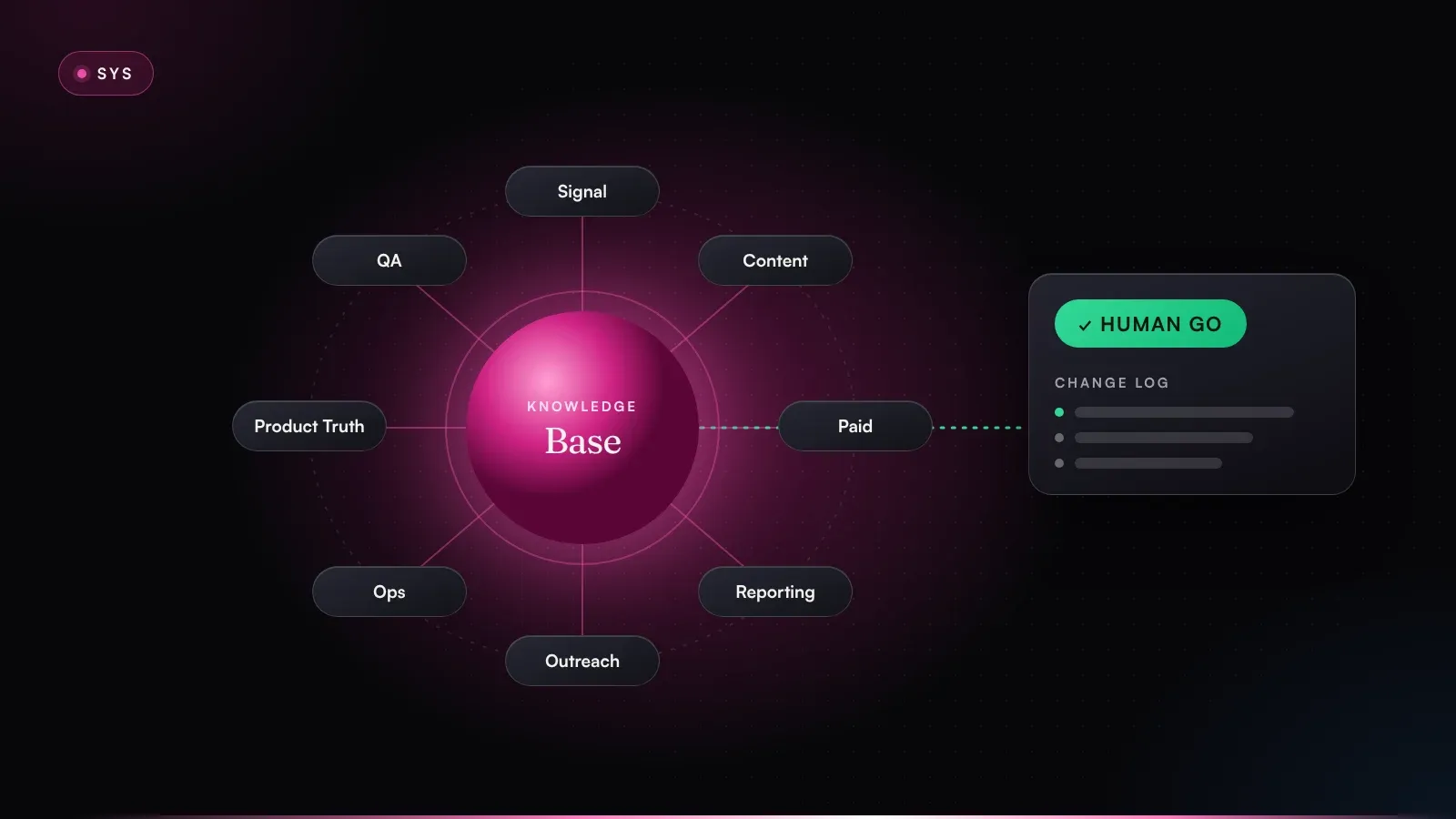
When I say custom AI agents, I mean more than a few saved prompts in a chat tool: a system with a defined architecture. In RevPrime®, the marketing operating system I build, that's five building blocks:
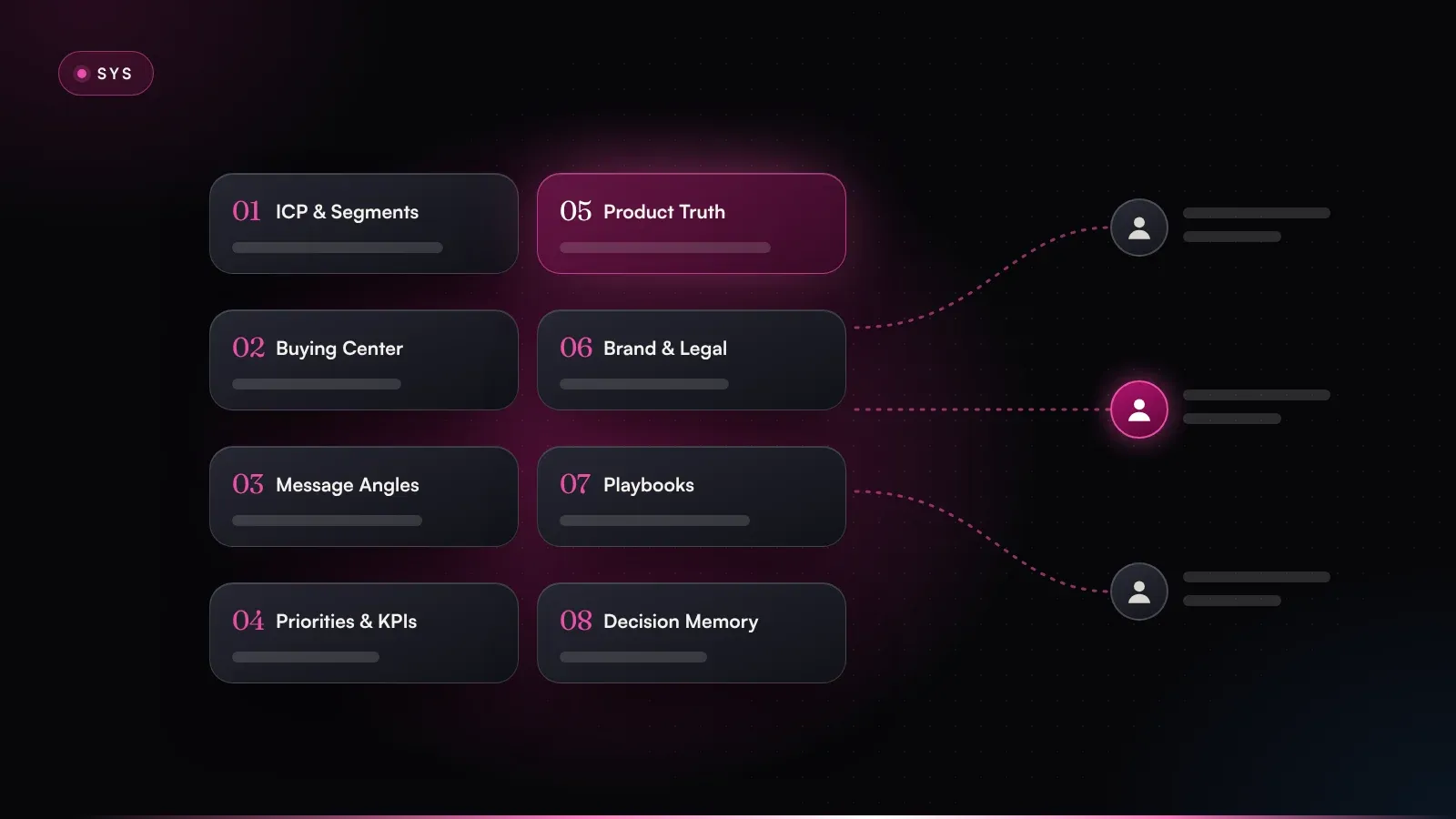
- Knowledge base first. Eight modules, each with an owner: ICP & segments, buying center, message angles, priorities & KPIs, product truth, brand & legal, playbooks & rules, and a decision memory. Every agent works from the same revenue logic. I explain how to build that foundation in the article on the AI marketing knowledge base.
- Agents with exactly one job. Signal, Angle & Content, Paid Media, Pipeline Reporting, Outreach Routing, Inbox & Ops, Product Truth, QA & Brand Guard, plus whatever your business needs on top. I don't build super-agents that do a bit of everything.
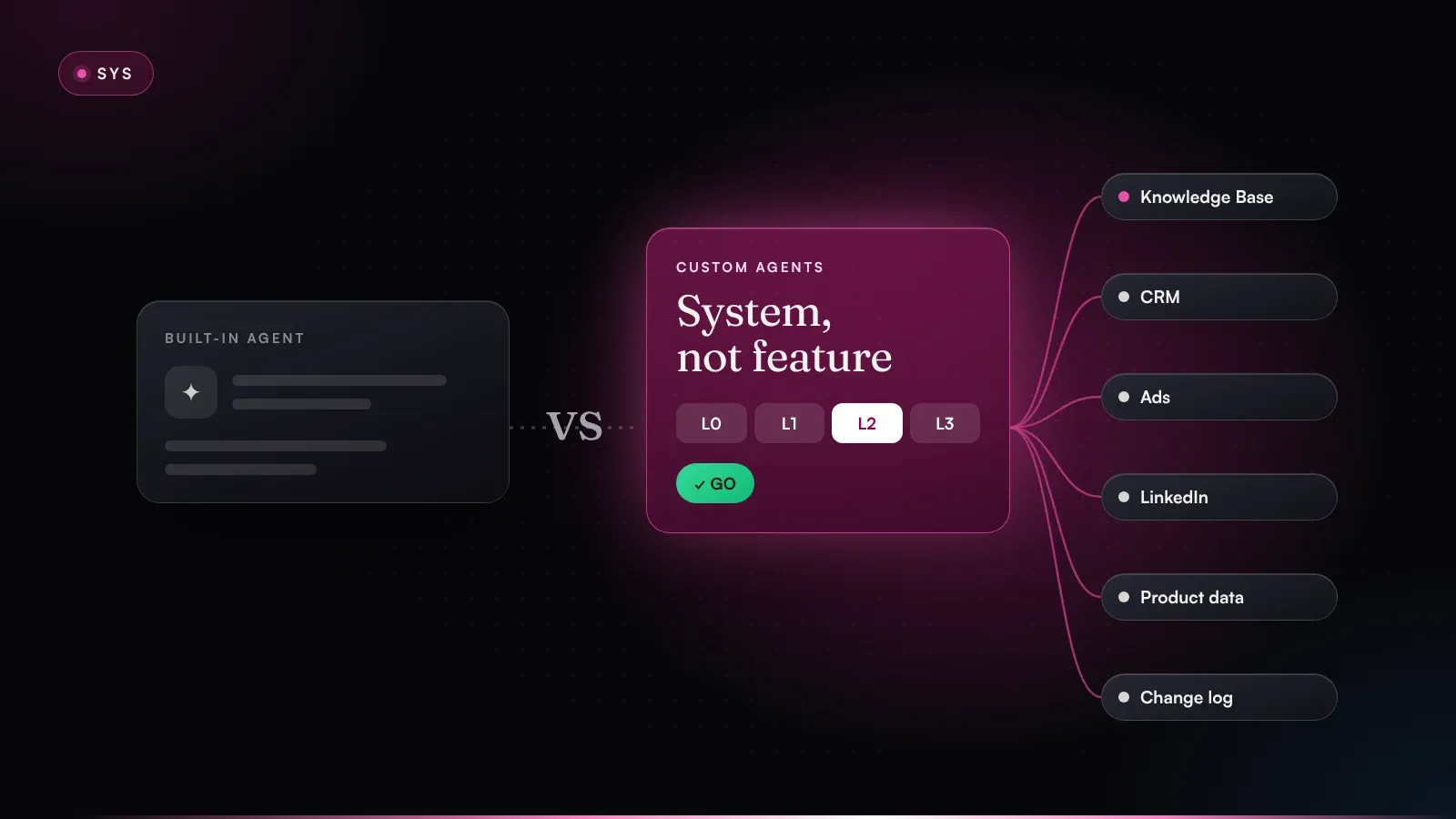
- Permissions per action. A four-step permission ladder: L0 read, L1 propose, L2 write after go, L3 approved rule. The level attaches to the individual action, whichever agent performs it.
- Writing into your tools. After the go, the agent writes straight into HubSpot, LinkedIn and Google audiences or the website. No copy-paste, no ticket.
- Change log and memory. Every proposal, every go and every no is logged with reason, before/after and result. The system learns from the corrections.
- 01Human go & change logPermission ladder L0–L3 per action
- 02Custom agentsSignal, outreach, paid, reporting
- 03Knowledge base8 modules with owners
- 04HubSpotCRM, workflows, Breeze
- 05Other signalsAds, LinkedIn, product, Clay
HubSpot stays the system of record. Custom agents work from a shared knowledge base and write back only after a go.
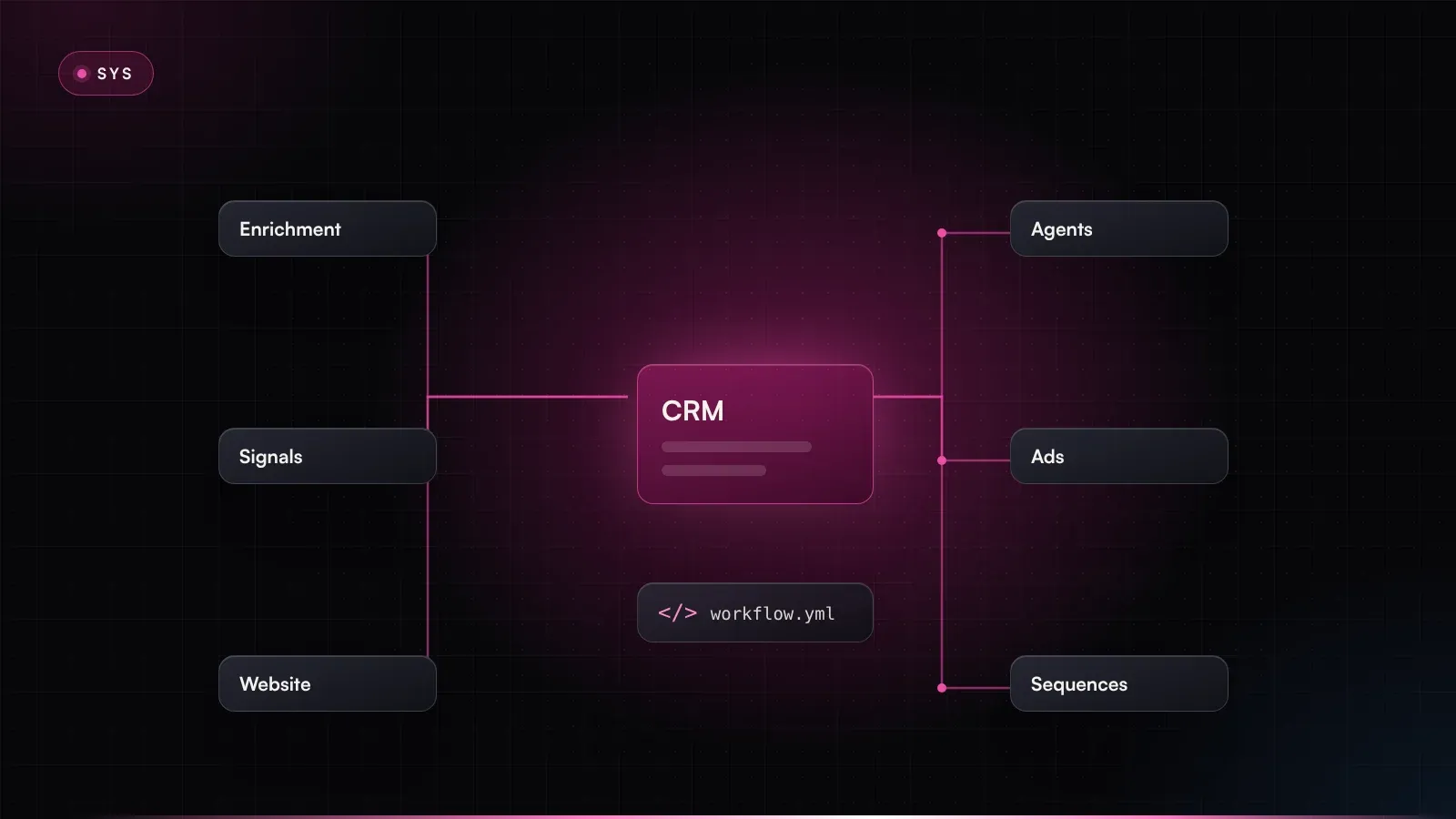
For the comparison, keep in mind that the system doesn't replace HubSpot. It sits on top of it. Contacts, deals, workflows and reports stay in HubSpot. The agents read via the API or the HubSpot MCP server and write approved changes back. The system is model-agnostic by design; by default, the agents run on Claude by Anthropic.
All of that comes at a price, to be fair. Custom agents need to be built, someone has to maintain them, and the knowledge base needs upkeep. If you can't or won't invest in that, a finished product often serves you better. More on the building blocks in the RevPrime® knowledge base.
HubSpot Breeze agents vs. custom agents, side by side
I don't want to turn this into a feature race. Both approaches use large language models, and both can write into HubSpot. Where they differ is what the agents work from, what they see, and who controls what. The Breeze column reflects how I read HubSpot's docs; the right column describes my setup.
| Criterion | Breeze agents | Custom agents on HubSpot |
|---|---|---|
| Context | CRM data, HubSpot content, documents uploaded per agent | Shared knowledge base with eight modules, owners and status |
| Signals | Mainly HubSpot; other apps via MCP connectors | HubSpot plus ads, LinkedIn, product data, Clay, intent – combined into one score |
| Governance | Settings per agent, e.g. review before sending, handoff rules, run limits | Permission ladder L0–L3 per action, go per action, change log with before/after |
| Model & prompts | HubSpot picks the models; you steer via instructions | Model of your choice, prompts versioned and documented |
| Costs | Credits per outcome or run, allowance per edition | Build plus model and running costs, directly measurable |
| Testability | Test runs in the builder, test tools for the Customer Agent | Fixed test cases, compared before every change |
| Time to start | Hours to days | Weeks |
HubSpot Breeze agents
- Ready in hours to days
- Context per agent
- Signals mainly from HubSpot
- Settings per agent
- HubSpot picks the model
Custom agents
- Built in weeks
- Shared knowledge base
- Signals from every tool
- Permission ladder per action
- Model and prompts under control
My take as of October 2026: Breeze starts faster; custom agents give more context and control for revenue-critical jobs.
Depth of context
An agent is only as good as what it works from. Breeze agents get CRM data plus whatever you hand each agent: documents, brand guidelines, instructions. That's solid, but for revenue work it's too generic in my view. What I miss is shared, maintained revenue logic: exclusion criteria in the ICP, a buying committee role model, message angles marked live, testing or retired, approved claims. In my setup, the marketing lead changes an angle once and every agent uses it the same day. If every agent carries its own knowledge instead, you maintain the same truth in several places, and sooner or later it drifts apart.
Signals beyond HubSpot
In B2B revenue marketing, the signals that matter rarely live only in the CRM: engagement with LinkedIn ads, trial usage, intent data, enrichment from Clay, wasted spend in Google Ads. HubSpot is opening up via MCP, which I think is the right move. A connector still isn't signal logic, though. Someone has to define, test and maintain how much a trial login counts compared with three visits to the pricing page. I walk through how I build that in the article on intent scoring with fit, intent and timing.
Governance per action
Breeze offers sensible switches: review before sending, handoff rules, run limits, permissions. What I miss for revenue-critical work is one consistent logic across all agents. In my system, the permission level attaches to the action: an agent may write a CRM note under an approved rule (L3) but needs an individual go for every email to a target account (L2). Every go and every no lands in the change log with a reason. You need that trail when leadership, IT or data protection ask who approved what, and when. Details in RevPrime® governance.
Control over model and prompts
According to its AI model cards, HubSpot uses its own models and models from third-party providers. For the prebuilt agents, as far as I can tell from the docs, you don't choose the model, and the prompts behind them belong to HubSpot. For standard jobs, that doesn't matter. For jobs where tone, claims and line of argument are your differentiation, I want versioned prompts I can read, test and roll back. I also want to be able to switch models when another one does a job better.
Predictable costs
Outcome-based prices are predictable per unit. It gets fuzzy on volume: how many leads will the agent recommend, how many runs does a custom builder agent need, how many records will you fill? HubSpot itself says per-run estimates are for guidance only and actual costs may vary. Custom agents have the same issue, except that there you see every call, every token and every run in your own monitoring. I'm not saying Breeze is more expensive. Just do the math beforehand so the bill doesn't surprise you afterward.
Testability
According to the docs, HubSpot now offers test runs in the builder and test tools for the Customer Agent. For revenue work, I test differently, with a fixed set of real cases (say, 30 accounts whose outcome you know). Every change to a prompt, model or rule has to pass that set before it goes live. If results get worse, the change doesn't ship.
When are HubSpot Breeze agents enough?
To be fair, there are jobs I wouldn't build a custom agent for. Breeze agents are a good choice when the data the job needs lives in HubSpot, the job is standardized and a mistake is cheap to fix.
Support and FAQ conversations are the classic case. If your help articles are in good shape, the Customer Agent is a fast, sensible lever, provided the handoff rules are unambiguous and you start with a small share. CRM data upkeep is similar: the Data Agent can fill properties like industry, size or tech in use that nobody maintains today. Check a sample before you run it on thousands of records, though.
Breeze is also often the better choice for teams without engineering capacity. If nobody can build and maintain a custom agent, a well-configured standard product beats a half-finished build. It works as a starting point anyway: if you've never worked with agents, Breeze teaches you fast where review is needed and which data is missing, and those lessons pay off later with custom agents too.
Decide per job: data needs beyond HubSpot and external impact determine how much context and control you need.
The matrix shows the logic: the more a job depends on data outside HubSpot and the higher its external impact on pipeline and brand, the more a custom agent pays off. Bottom left, Breeze is enough. Top right, I'd build.
If an agent's mistake annoys a customer, burns budget or costs a deal, I want full control over context, rules and approval. If it just fills a field wrong, a good standard product will do for me.
Example: a SaaS team assigns the jobs
A fictional example makes this concrete. Say Fertigo, a made-up vendor of quality management software for mid-sized manufacturers, sells at an ACV of around €35,000 with a four-to-six-month sales cycle. The team: one marketing lead, two account executives, a part-time RevOps role. The stack: HubSpot Marketing, Sales and Service Hub Professional, LinkedIn and Google Ads, Clay for enrichment, and a trial whose usage data lives in the product.
The team goes through it job by job and records the result in a decision brief:
Job                         Data           Impact   Solution
Support chat (FAQ, setup)   HubSpot KB     medium   Breeze Customer Agent
                                                   Start: 20% of chats, handoff on pricing
Fill industry/ERP field     HubSpot + web  low      Breeze Data Agent
                                                   Sample of 100 records before rollout
Account prioritization      HubSpot, ads,  high     Custom Signal Agent
                            trial, Clay             Score 0–100, writes property via L3 rule
First touch, target accts   HubSpot, KB    high     Custom Outreach Routing Agent
                                                   L2: go per account by the AE
Maintain LinkedIn audiences Ads, HubSpot   medium   Custom Paid Media Agent
Weekly pipeline report      HubSpot        medium   Custom Pipeline Reporting Agent

Not enabled: Prospecting Agent with “send without review”
Review date: in 6 months (re-check Breeze product state)
Owner: marketing lead · Approved by: CEO
The interesting part is how the custom agents run, because it shows how tightly they're woven into HubSpot. The Signal Agent reads web visits and deal history from HubSpot, ad engagement from LinkedIn, trial usage from the product and company data from Clay. It condenses that into a score and writes it back to HubSpot as a property. When an account crosses the threshold set in the knowledge base, the Outreach Routing Agent proposes a first touch, including angle, sender and reasoning. The proposal lands as a task for the account executive in HubSpot.
- 01Read signalsHubSpot, ads, trial, Clay
- 02Write scoreProperty via L3 rule
- 03ProposalAngle, sender, reason
- GOAE's goGo, edit or no
- 05Change logBefore, after, reason
Fictional example: the custom agent reads from several tools, proposes in HubSpot and writes only after the account executive's go.
Account:   Metal fabrication, ~600 employees · score 78 (+21 in 7 days)
Signals:   Trial for 9 days, 3 users, audit module opened 14×
           LinkedIn: 2 clicks on angle “Audits in days, not weeks”
           HubSpot: pricing page visited 2×, no open deal
Angle:     Audit prep (status: live) · Proof: foundry case study
Proposal:  1:1 email to head of quality, referencing the audit module
Rights:    L2 · nothing is sent without your go
Options:   [Go]  [Edit]  [No + reason]
Log:       Proposal #4127 · change-log entry after decision
The account executive knows the customer is preparing for a certification audit. She sharpens the first sentence and gives the go. The email goes out from HubSpot and the activity shows up on the contact, while the change log records before, after and who decided. To sales, it all looks like normal HubSpot work, only better prepared.
Meanwhile, the Customer Agent keeps running in the support chat. The two don't get in each other's way as long as it's defined which agent may write which properties, and that rule belongs in the playbooks module of the knowledge base.
What agents take over and what you decide
Breeze or custom, the line between agent and human follows external impact. Anything that reaches a person outside your team or moves budget needs a go. In the example it looks like this, with the closest Breeze setting next to each action:
| Action | Permission level | Closest Breeze setting | What you decide |
|---|---|---|---|
| Read CRM, ads and trial data | L0 · Read | Agent's data access | Which sources are allowed |
| Write account score as property | L3 · Approved rule | Agent in a workflow | Once: formula and threshold |
| First touch to a target account | L2 · Write after go | Prospecting Agent with review | Copy, sender, timing |
| Sequence without individual review | L3 · Approved rule | Send without review | I wouldn't approve this for first touches |
| Change an audience or budget | L2 · Write after go | No direct equivalent | Every change individually |
| Support answer from help articles | L3 · Approved rule | Customer Agent with handoff rules | Topics, handoff, share |
Agents do the work. Humans make the decisions. That's true for Breeze agents and custom agents alike. What differs is how finely you can set it and how completely you can prove it.
How permissions, data flows and logs are documented in practice is covered under security & governance.
Test before you buy: the checklist
The best answer to “Is Breeze enough?” comes from a test with your own data. No article can give you that, this one included. Both options run against the same cases, and you measure what counts in the end. How impressive the demo was doesn't matter here.
- Pick one job, not five (e.g. first touch for tier-1 accounts)
- Define 20 to 30 real cases whose outcome your team knows
- Set success criteria up front: correction rate, time to go, error types
- Check what data the agent needs for this job and whether it lives in HubSpot
- For Breeze: work out edition, credit use per unit and expected monthly volume
- Turn on review mode; keep “send without review” off during the test
- Log every correction with a reason, since that shows which knowledge is missing
- Clarify with data protection and IT which data goes to which model
- Decide after four weeks: adopt, refine or build
Three metrics are enough to decide. The correction rate shows how often a human had to change the proposal, and time to go whether the agent takes work off your plate or creates more. Whether it's all worth it shows up in pipeline impact: replies, meetings and opportunities from the tested accounts. Output ↑, pipeline → isn't success.
Common mistakes when deciding
What I see again and again in projects isn't the wrong tool, it's the wrong question. Five patterns:
- Deciding per feature, not per job. “HubSpot has a Prospecting Agent now, so let's use it” isn't a strategy. Understand the job and its data first, then pick the tool.
- Skipping the knowledge base. Without a documented ICP, angles and claims, Breeze and custom agents alike produce generic output. AI without a system just produces the wrong thing faster.
- Turning on “send without review” too early. It saves time until the first off-target email reaches a key account. For first touches in high-ACV deals, I wouldn't approve it.
- Not modeling credits. If you don't multiply credits per unit by expected volume up front, you only notice the cost once the allowance runs dry.
- Building without an owner. A custom agent with no one maintaining prompts, rules and tests gets worse than any standard product. Building also means running it.
A sixth mistake hides in the question itself: thinking either-or. In most HubSpot setups I see, the best answer is a combination.
Getting started in four weeks
You don't need months of evaluation. Four weeks are enough to decide, with real data, which jobs Breeze takes on and where you need custom agents.
- Week 1Jobs & dataInventory and matrix
- Week 2Test BreezeStandard jobs in review
- Week 3Side-by-sideCritical job, 20–30 cases
- Week 4DecidePer job, with an owner
Understand the jobs, then test, then decide – with real cases instead of demo impressions.
Week 1: inventory jobs and data
List the five to eight recurring jobs in marketing and sales that agents could take over. For each one, note what data it needs, where that data lives and what a mistake would cost. That places every job in the matrix.
Week 2: test Breeze where it fits
For the jobs in the bottom left of the matrix, turn on the matching Breeze agents in review mode: Customer Agent on one channel with a small share, Data Agent on a sample. In parallel, define the test set for the revenue-critical jobs.
Week 3: side-by-side test on the critical job
For one job in the top right, usually account prioritization or first touch, run Breeze and a lean custom agent against the same 20 to 30 cases. Log every correction with a reason.
Week 4: decide and document
Compare correction rate, time to go and early pipeline signals. Record the decision per job, with an owner and a review date. Breeze jobs get clear boundaries; custom agents get a plan for knowledge base and permissions.
My take
To close, and explicitly not as a pitch, here's my assessment of the product as of October 2026. For support FAQs, data upkeep and getting started with agents, HubSpot Breeze agents are a reasonable starting point, especially if you have no engineering capacity. For the jobs that decide pipeline in B2B revenue marketing (account prioritization, first touch, paid media, pipeline reporting), I wouldn't rely on them right now. What I miss there is the shared revenue logic, the signals beyond HubSpot and the per-action control I consider necessary for that work.
Marketing is part of revenue – or it's overhead. Agents doing revenue work have to be measured against that.
You don't have to leave HubSpot for this. What I recommend is strengthening HubSpot as the system of record and building the revenue-critical agents on top of it, with your own knowledge base, permission ladder and change log. Breeze can handle the standard jobs alongside. Take a fresh look every six months, because HubSpot is improving its agents quickly. When they meet my criteria, I'll say so just as clearly.
For a broader view of which agents move the needle first in B2B marketing, see the guide to AI agents for B2B marketing. If you're weighing automated SDRs specifically, read the article on AI SDRs in B2B.
If you want to know what Breeze can handle in your stack and where custom agents pay off, book a free 30-minute diagnosis call. We'll look at your jobs, your data and your HubSpot portal and work out whether building from scratch (Build) or repairing what you have (Repair) is the better path.
Frequently asked questions
What are HubSpot Breeze agents?
Breeze agents are the AI agents HubSpot offers inside its product, such as the Customer Agent, Prospecting Agent and Data Agent. HubSpot now groups them in Agent Hub, where you activate and monitor prebuilt agents and ones you create with the agent builder. They're billed in HubSpot Credits.
How much do HubSpot Breeze agents cost?
According to HubSpot, Breeze agents consume HubSpot Credits, and each agent has its own unit, such as per resolved conversation, per recommended lead or per run. An allowance comes with your edition, resets monthly and expires if unused. Current prices are listed in HubSpot's Product & Services Catalog and can change at any time.
Are HubSpot Breeze agents good enough for B2B marketing?
For support FAQs, data upkeep and first experiments, often yes. For revenue-critical jobs like account prioritization, first touch or paid media, I wouldn't rely on them at the October 2026 product state, because shared revenue logic, signals beyond HubSpot and per-action control are missing. That's my assessment, and it may change with new releases.
Can I connect custom AI agents to HubSpot?
Yes. Custom agents read from the CRM via the HubSpot API or the HubSpot MCP server and write approved changes back, such as properties, tasks or activities. HubSpot stays the system of record, and Breeze agents can keep running alongside.
What's the difference between HubSpot's agent builder and custom agents?
The agent builder lets you create agents inside HubSpot, with instructions, actions and knowledge, on the models HubSpot uses. Custom agents run outside, with a model of your choice, versioned prompts, a shared knowledge base and signals from every tool. In return, they need to be built and someone has to run them.
Should I turn on “send without review” in the Prospecting Agent?
For first touches in high-ACV deals, I wouldn't recommend it. In my view, one off-target message to a key account costs more than the review time you save. Start in review mode, measure the correction rate and decide on more autonomy only once you have real data.

About the author
Mario Maier
AI-native revenue marketing engineer · founder of igromo
For more than 15 years I've worked at the intersection of marketing, sales and revenue operations, from early-stage setups to scale-ups with multi-stage sales cycles and large buying centers. Since 2019 I've measured my work on pipeline and revenue.
Where do you stand?
The agentic readiness check shows in 3 minutes how ready your marketing is for agents – and which gaps to close first.
Keep reading
All insightsSYS24 min read
AI agents for B2B marketing: the complete guide from first prompt to pipeline
AI agents for B2B marketing that move pipeline: definition, architecture, 8 core agents with workflows, what not to automate, KPIs and a 90-day plan.
SYS20 min read
How to build an AI marketing knowledge base: 8 modules, clear rules and a template
Build an AI marketing knowledge base: 8 modules with owners and a copyable template, what belongs in the prompt and what doesn't, governance, a 4-week plan.
SYS21 min read
GTM engineering: what a GTM engineer does – and when you need one
What a GTM engineer does, how the role differs from RevOps, when to hire one and when AI agents cover the work. With a decision matrix and a 90-day example.